
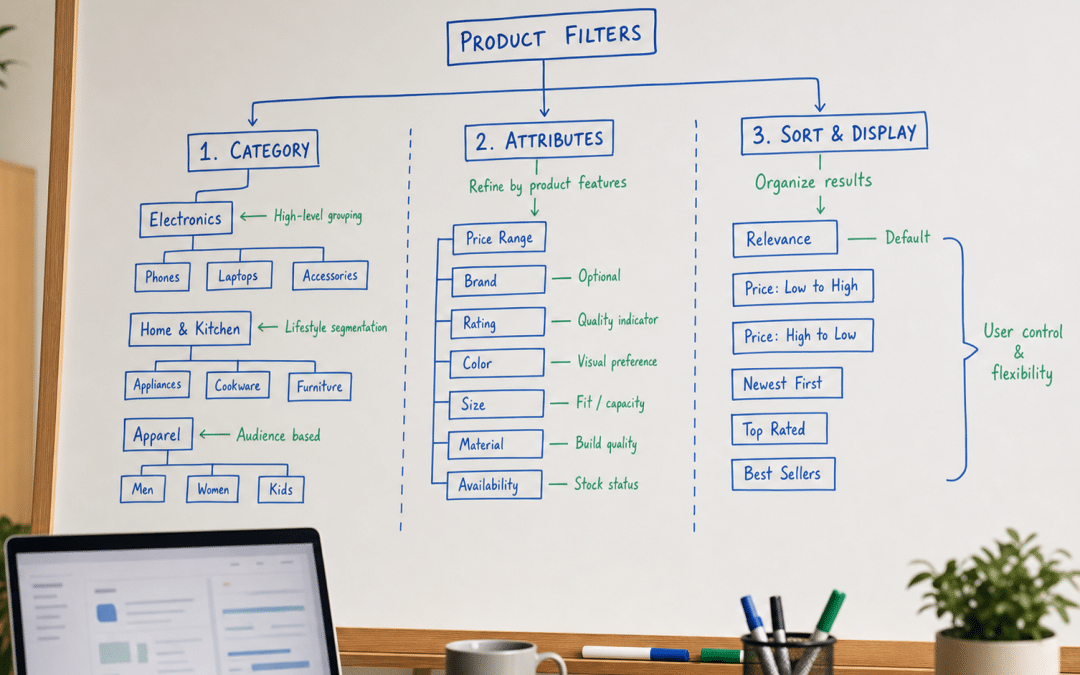
Faceted navigation seo guide: faceted navigation is the filtering system on ecommerce sites — the colour, size, brand, and price selectors — and it is one of the most common reasons a growing South African online store stalls in organic search. Done wrong, a 5,000-product catalogue generates hundreds of thousands of near-identical URLs that drain Googlebot's crawl budget, create duplicate content at scale, and dilute the link equity your category pages need to rank. Done right, those same filters become a long-tail landing-page machine that captures searchers far more likely to buy than anyone typing a broad head term. This South African SEO guide gives you the specific decision logic to know which filter URLs to index, which to noindex, and which to block at robots.txt — so your crawl budget goes to pages that earn you revenue.
SA ecommerce is growing fast. With online retail approaching 6% of total retail spend and more than 77% of shoppers browsing on mobile — where filtering is the primary navigation tool — the stakes for getting faceted navigation right are real and rising. Whether you are running a Shopify store, a WooCommerce catalogue, or a custom-built platform, the same underlying rules apply.
Quick Answer
A faceted navigation seo guide is a framework for deciding which filtered URLs should be indexed, noindexed, or blocked via robots.txt on an ecommerce site. The core rule: block or AJAX-render filters that never match search intent (sort order, stock status, price sliders); noindex low-value combinations; and build clean, keyword-validated landing pages for high-demand filter combinations — such as "grey corner sofas" or "women's blue running shoes" — that real users actually search for.
Jump to a Section
The Three SEO Problems It Creates
Index, Noindex, or Block? The Decision Framework
Is your ecommerce site leaking crawl budget through filters?
Send us your GSC Coverage report and we will show you exactly which filter URLs are competing with your real category pages.
Get a Free Coverage AuditWhat Is Faceted Navigation and Why Does It Matter for Search?
Faceted navigation is a filtering system that lets users refine a product catalogue using multiple simultaneous attributes — size, colour, brand, price range, material, and so on — without leaving the category page. Every major SA ecommerce site uses it: Takealot's sidebar lets you filter by category, brand, price band, and rating; Superbalist's fashion ranges filter by size, colour, and delivery speed; Woolworths lets shoppers narrow by occasion, fit, and fabric.
The SEO complication is structural. A category page with five filter types, each with ten options, can generate up to 100,000 URL combinations — and most ecommerce platforms create a unique URL for every combination by default.
Google's crawling infrastructure documentation is explicit: faceted navigation is "by far the most common source of overcrawl issues site owners report." The resource cost falls on your server, your crawl budget, and your ability to get new pages discovered quickly.
Facets vs. Filters: The Distinction That Drives Your Decision
Facets are attribute-based pages worth indexing when they match real search demand: product type, colour, brand, gender, material. A page for "women's navy linen trousers" is a facet page with genuine search volume.
Filters are user-convenience tools with no independent search demand: price sliders, sort order (price-asc, newest), in-stock toggles. Nobody types "women's trousers price ascending" into Google. These should never be indexed.
The Three SEO Problems Faceted Navigation Creates
Faceted navigation causes three specific, measurable harms to a site's organic search performance — and they compound each other.
1. Duplicate Content at Scale
A filter combination like /women/tops?colour=blue&size=medium and /women/tops?size=medium&colour=blue render the same page but occupy two different URLs. Multiply that by every permutation across your filter taxonomy and you have thousands of pages with identical title tags, identical product grids, and identical body copy. Google cannot reliably determine which version to rank, and none of them accumulates the authority they would if signals were consolidated.
2. Crawl Budget Waste
Googlebot allocates a crawl budget to each site based on its crawl allowance (server capacity) and crawl demand (page popularity and freshness). When Googlebot spends that budget crawling ?sort=price_asc&colour=red&in_stock=true combinations, it has less capacity to discover your new product pages, blog posts, and updated category pages. For larger South African stores — those with several thousand SKUs across multiple categories — this is the most common reason new pages take weeks to appear in search results.
3. Diluted Link Equity
Internal links from your homepage, navigation, and blog pass ranking signals to every URL they point to. When those links spread across hundreds of near-identical faceted URLs, each individual URL receives a diluted share of that signal. Your core category pages — the ones that actually rank for head terms — end up weaker than they should be because their authority has leaked into a thousand filter URL variants.
How Index Bloat Plays Out in Practice
Imagine a mid-sized SA furniture store with a few thousand products across a dozen categories. Every filter combination is enabled by default — colour, material, room type, price range, delivery speed. The result: Google discovers and indexes tens of thousands of near-identical filter URLs, while the genuine product and category pages represent a small fraction of the indexed total. Core category pages drop in rankings despite having real backlinks — not because the content is weak, but because every crawl signal they earned has been diluted across thousands of parameter variants.
Index, Noindex, or Block? The Decision Framework for Every Filter Type
The single most valuable output of any faceted navigation seo guide is a clear decision rule for every filter type on your site. Here is the framework — apply it to each filter in your taxonomy.
| Filter Type | Decision | Reason |
|---|---|---|
| Sort order (price-asc, newest, bestselling) | Block (robots.txt) | Zero independent search demand; pure user convenience |
| Stock / availability toggles | Block (robots.txt) | Content changes hourly; no stable landing-page value |
| Price range sliders | Block (robots.txt) | Price-range queries rarely map to a stable search intent; no reliable landing-page value |
| Single colour or material on a major category | Index if search demand confirmed | "Grey fabric corner sofas" has real volume; build a proper landing page |
| Single brand on a major category | Index if brand has search volume | "Samsung TVs" or "Nike running shoes" are navigational queries worth owning |
| Two or more attributes combined | Noindex unless keyword-validated | Combinations multiply fast; index only those with verified demand |
| Three or more attributes combined | Block (robots.txt) | Rarely searched as a phrase; crawl cost exceeds any indexation benefit |
| Duplicate facet type (two colours selected) | Noindex | Creates same-type duplicate with no incremental search value |
The keyword validation step is non-negotiable. Before indexing any facet combination, check search volume using a tool like Google Search Console (for existing traffic data) or a keyword research platform. A facet page earns an index slot only when real searchers are looking for that exact combination.
The One Rule That Cuts Through the Complexity
Ask this question about every filter URL: "Would a real person in South Africa type this into Google to find this page?" If the answer is no — if the URL is a mechanical combination of attributes with no search intent behind it — block it or noindex it. The index is for pages people look for, not pages they navigate through.
The Three-Part Technical Toolkit
Once you have applied the decision framework to your filter taxonomy, you implement it using three tools — each with a specific job and specific limitations you need to understand.
Tool 1: robots.txt (Crawl Prevention)
Robots.txt tells crawlers not to visit a URL at all. This is the right tool for filter types with zero indexation value — sort order, stock toggles, price ranges. A typical rule looks like:
Disallow: *?sort=*
Disallow: *?availability=*
Disallow: *?price_min=*
Important: robots.txt prevents crawling, not indexing. If another site links to a blocked URL, Google may still list it in search results without content. For pages you want neither crawled nor indexed, robots.txt is still the right tool — just understand it does not give you indexation control over externally linked URLs.
Tool 2: Canonical Tags (Signal Consolidation)
For facet pages you decide to allow crawling but consolidate — for example, parameter-order variants of the same combination — the canonical tag signals which version is preferred. Both ?colour=blue&size=medium and ?size=medium&colour=blue should carry a canonical pointing to a single consistent URL.
The critical limitation: Google treats canonical tags as hints, not instructions. If you have thousands of low-value faceted URLs with internal links pointing to them, Googlebot will crawl many of them regardless of canonical tags. Canonical tags reduce duplication signals — they do not replace robots.txt for crawl control.
Tool 3: AJAX / Client-Side Rendering (Crawl Elimination)
The cleanest solution for user-only filters is to implement filtering entirely in JavaScript without changing the URL. When a user selects "In Stock Only" or drags the price slider, the page updates dynamically but the URL stays the same. Google does not crawl a new URL because no new URL exists. This approach eliminates the crawl problem at source — there is nothing for Googlebot to waste budget on.
The trade-off: if your JS rendering is heavy and your server is already under load (a real consideration during SA load-shedding periods when many sites experience traffic spikes as users shift online activity), client-side rendering adds page-load time. Test performance before implementing it site-wide.
Best Practice: The Consistent Parameter Order Rule
Regardless of which tool you use, enforce a consistent parameter order in all your faceted URLs. If your platform generates both ?colour=blue&size=medium and ?size=medium&colour=blue, canonicalise all variants to the alphabetical or attribute-priority form. Google's crawling documentation recommends consistent ordering specifically to prevent URL duplication from the same filter combination.
Not sure which filters are eating your crawl budget right now?
Tell us your platform (Shopify, WooCommerce, custom) and we will assess whether your current filter setup is limiting your indexation — no obligation, back to you within 24 hours.
Get a Platform AssessmentThe Long-Tail Opportunity: When Facets Become SEO Assets
Here is the part most faceted navigation seo guide discussions underplay: building topical authority through faceted navigation is one of the highest-ROI content strategies available to a South African ecommerce store — but only if you approach it as a deliberate keyword programme, not an accidental URL proliferation problem.
Consider a furniture retailer. The head term "corner sofas" has substantial monthly search volume. But "grey corner sofas" and "grey fabric corner sofas" represent a long-tail demand ladder — searchers at these more specific queries are closer to purchase. A well-built facet landing page for "grey fabric corner sofas" — with a unique H1, a one-paragraph intro, and a clean filtered product grid — captures that intent in a way a generic category page never can.
The same pattern applies across SA ecommerce verticals: "women's navy linen trousers," "Samsung 65-inch QLED TV," "Nike Air Max running shoes size 11" — each is a facet combination with genuine search demand worth owning as a proper page.
How to Validate a Facet Page for Indexation
Before promoting a filter combination to an indexed landing page, check three things:
1. Search demand exists — Use Google Search Console to see if you already receive impressions for the combination phrase. If you are ranking page 5 with no optimisation, a properly built page will move.
2. Product inventory is stable — An indexed page for "blue velvet dining chairs" needs at least several products to remain live. A page that goes empty becomes a soft 404 and needs a 301 redirect or a 404 response.
3. The page has unique meta content — Title tag: "Blue Velvet Dining Chairs | [Brand]". H1: the filter phrase. A short intro paragraph. Without this, the page has no meaningful differentiation from the parent category.
How to Audit Your Site: A Faceted Navigation SEO Guide Checklist
Before implementing any changes, audit what you currently have. Three tools cover the essentials.
Google Search Console — Coverage Report: Filter by "Indexed" and export the URL list. If you see tens of thousands of indexed URLs on a site with only a few thousand products, filter URLs are being indexed at scale. The "Discovered – currently not indexed" and "Crawled – currently not indexed" tabs reveal URLs Googlebot is finding but not ranking — often thousands of low-value facet combinations that are consuming crawl allowance without benefit.
Site crawl tool (Screaming Frog, Sitebulb, or similar): Crawl your site with a depth limit and examine the URL list. Count parameter-based URLs vs clean URLs. As a working rule of thumb: if parameter URLs outnumber your product and category pages by a ratio of five-to-one or more, you have a facet control problem worth solving.
Log file analysis: If you have server log access, examine which URLs Googlebot actually requests. This reveals the real crawl-budget picture — including which filter combinations are being visited, at what frequency, and whether that frequency has changed after a recent site update. Improving crawlability starts with understanding the actual crawl pattern, not guessing it.
Run the audit before and after any facet control changes. A well-implemented robots.txt rule for sort-order parameters can substantially reduce the crawlable URL count on large catalogues — creating measurable capacity for Googlebot to discover and index new and updated pages faster.
Prioritise by Impact, Not by Effort
If your audit reveals both index bloat and a missing long-tail landing-page programme, fix the bloat first. Remove crawl drag before you add new pages — otherwise new pages join the queue behind the existing noise. Block sort-order and availability filters, consolidate parameter-order duplicates with canonicals, then build keyword-validated facet landing pages from a clean baseline. This is the sequencing that produces ranking results you can attribute to the facet work. See also: how to prioritise SEO fixes.
Why South African Businesses Choose Growth Pulse Media for Technical SEO
Faceted navigation problems are a technical SEO challenge — but the strategy behind them is commercial. Which filter combinations should become landing pages is a keyword and conversion question, not just an engineering one. At Growth Pulse Media, we work at the intersection of both: Dirk built and scaled a South African ecommerce business before founding the agency, so the trade-offs between platform constraints, crawl budget, and ranking velocity are ones we have navigated with real money on the line.
We handle a limited number of clients at any time so that every technical SEO engagement gets senior attention. When we audit a faceted navigation setup, we are looking at your specific platform (Shopify, WooCommerce, Magento, or custom), your catalogue size, your current GSC Coverage data, and your top-priority category terms — not running a generic checklist. SA ecommerce platforms each implement filtering differently; a robots.txt rule that works cleanly on Shopify needs different implementation on WooCommerce with a third-party filter plugin.
If you are running a growing SA online store and organic traffic from category pages has plateaued despite adding new products, faceted navigation control is one of the first places we look. It is unglamorous work, but it consistently unlocks ranking performance that content alone cannot achieve.
Who This Faceted Navigation SEO Guide Is NOT For
Stores with fewer than 200 products
If your catalogue fits on two or three pages, faceted navigation generates a manageable number of filter URLs and crawl budget is not meaningfully affected. Your time is better spent on building strong content briefs and earning category-page authority through links and on-page depth.
Sites that have not yet resolved indexation basics
Faceted navigation control is a leverage play — it amplifies what you already have. If your core category pages are not indexed, your internal linking is broken, or you have substantial crawl errors, fix those first. Sophisticated facet control on a site with broken fundamentals produces no measurable gain.
Businesses looking for an immediate traffic spike
Technical SEO changes — including facet control — take weeks to propagate through Google's index. After implementing robots.txt rules and canonical consolidation, you may see Search Console Coverage numbers shift within days, but ranking and traffic changes typically lag by weeks to months as Googlebot re-crawls and re-evaluates the affected pages. SEO timelines in South Africa are not faster than anywhere else.
Ecommerce teams that cannot implement technical changes
Faceted navigation fixes require developer access: robots.txt edits, canonical tag implementation in your theme or platform, and potentially JavaScript filtering changes. If your team cannot make server-side or theme-level changes, the strategy cannot be executed. Resolve the access question before the technical SEO question.
Ready to turn your filter system into a ranking asset?
Walk us through your catalogue size and current platform — we will tell you within one call whether facet landing pages or crawl control should come first for your specific setup.
Book a Technical SEO CallFrequently Asked Questions: Faceted Navigation SEO Guide
What is the difference between faceted navigation and pagination for SEO?
Faceted navigation filters a product set by attributes (colour, brand, size), creating a different subset of products. Pagination divides a single product set across multiple pages (page 1, page 2). Both create multiple URLs from a single category, but the SEO handling differs: pagination uses rel="next" / rel="prev" markup (now deprecated but still useful as a crawl signal) or consolidates to the first page via canonical; faceted navigation requires the index/noindex/block decision framework described in this guide. Pagination SEO best practices covers that topic separately.
Should I use noindex or robots.txt to block faceted filter URLs?
Use robots.txt (Disallow) for filter types that are unlikely to ever need indexing — sort order, stock toggles, price ranges. Use noindex for low-value facet combinations where you want to preserve crawlability but remove indexation signals — for example, two-attribute combinations that have no search demand but may appear in site searches. The key difference: robots.txt stops the crawl (saving server resources); noindex stops the indexation but still costs crawl budget because Googlebot must fetch the page to read the tag.
Can faceted navigation help with long-tail SEO rather than just hurting it?
Yes — and this is the underutilised side of faceted navigation SEO strategy. A well-governed facet landing page for a specific combination ("women's navy linen trousers" or "Samsung 65-inch QLED TV") captures long-tail search intent that a generic category page cannot rank for. The condition is that the page has genuine search demand, stable product inventory, and unique meta content (title, H1, description). Without keyword validation and proper on-page content, facet landing pages are just more pages competing with each other.
How do I know if faceted navigation is hurting my SA ecommerce site?
Check your Google Search Console Coverage Report. If your indexed-page count is significantly higher than your actual product and category count — as a hypothetical illustration: tens of thousands of indexed pages on a store with a few thousand products — filter URLs are being indexed at scale. Also check the Discovered - currently not indexed tab: a large volume there suggests Googlebot is finding filter URLs, queuing them, and deprioritising your real pages. A site crawl tool will show you the ratio of parameter-based URLs to clean URLs on your site.
Do Shopify stores have specific faceted navigation SEO challenges?
Yes. Shopify's native collection filtering generates parameter-based URLs by default (for example, /collections/women?filter.p.tag=blue). Shopify's built-in canonical implementation points filter URLs back to the base collection, which helps with duplication but does not prevent crawling. For stores with large catalogues, adding robots.txt Disallow rules for filter parameters and implementing AJAX filtering via Shopify's storefront API (which does not change the URL) are the two most effective technical fixes available within Shopify's platform constraints.
Fix Your Faceted Navigation — Before It Fixes Your Rankings for You
Growth Pulse Media runs technical SEO for South African ecommerce businesses — Shopify, WooCommerce, and custom platforms. We audit your filter setup against your GSC Coverage data, identify which combinations are leaking crawl budget, and build the keyword-validated landing-page programme that turns your filter system into a ranking asset. Senior SEO attention, limited client load, and real answers about your specific platform and catalogue. No obligation — we will get back to you within 24 hours.
Start the Conversation