
 Add to Preferred Sources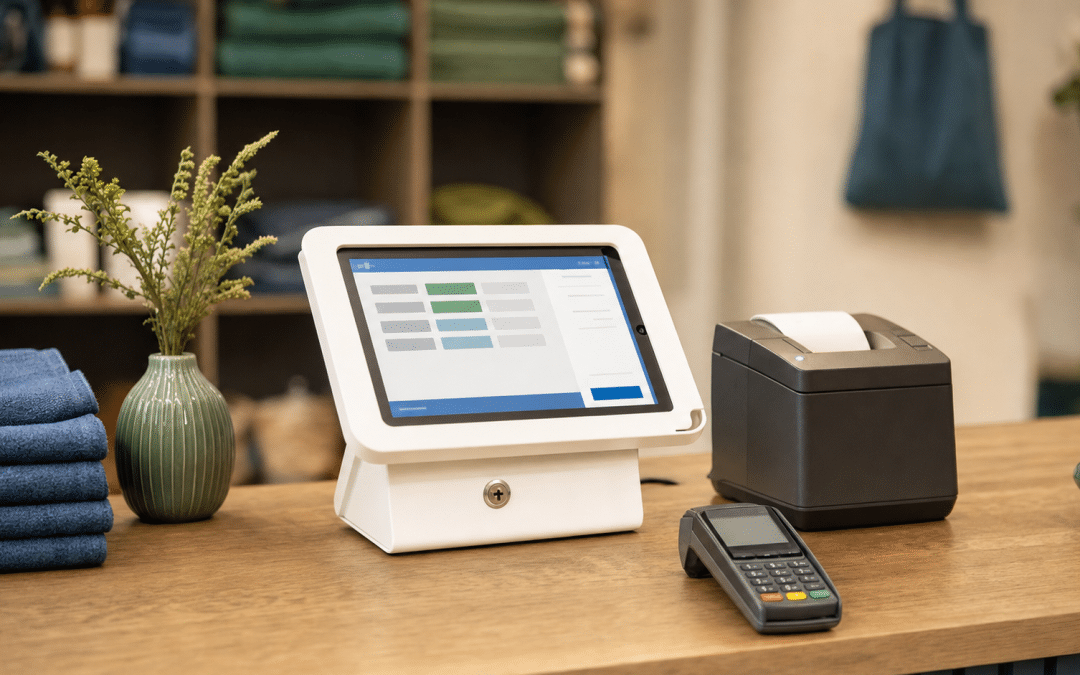
Shopify POS hardware in South Africa splits into two distinct categories, and getting them confused is what sends most merchants down a frustrating dead end. As part of a full Shopify build in South Africa, the in-store hardware setup is solvable — but only once you understand what Shopify's own store supplies and what you must source locally. The short answer: payment terminals must come from SA providers, while till peripherals (printers, scanners, stands) can be bought from South African retailers and plugged straight in.
The reason for the split is a single structural fact: Shopify POS in SA runs the full till software on your iPad or Android tablet, but Shopify Payments — which activates Shopify's own card readers and the POS Go handheld — is not available in South Africa as of mid-2026. The POS app, inventory management, customer profiles, and reporting all work perfectly here. The card swipe is where you bring in an SA provider.
Quick Answer
Shopify POS hardware for South African retailers means a tablet running the Shopify POS app, an SA card reader (Yoco or iKhokha), and optionally a locally sourced Epson or Star Micronics receipt printer, barcode scanner, and cash drawer. Shopify's own hardware store does not ship to South Africa, and its payment terminals require Shopify Payments (unavailable in SA). Peripheral hardware — printers, scanners, stands — is fully compatible and widely available from SA POS suppliers.
Jump To
The Two-Category Hardware Model for SA
SA Card Readers: Yoco vs iKhokha
Receipt Printers — Supported Models & SA Prices
Scanners, Stands, and Cash Drawers
How the SA Two-System Till Works
Setting up Shopify POS and not sure which hardware to buy?
Share your store setup with us and we'll give you a clear list of what to order — no jargon, no upsell.
Get a Hardware ReviewWhat Shopify POS Hardware Ships to South Africa?
Shopify's hardware store (hardware.shopify.com) covers North America, Europe, and select Asia-Pacific markets. It does not ship to South Africa. That means the POS Terminal (approximately $349 as of mid-2026, per Shopify's blog), first-party Card Reader (approximately $49), and POS Go handheld — Shopify's all-in-one device with a built-in scanner, card reader, and POS platform — are not officially purchasable or supported here. Even if you import them, the payment terminals require Shopify Payments to process cards, and Shopify Payments is not available in SA.
In 2026, Shopify announced a partnership with Verifone, introducing the Victa Mobile and Victa Lane countertop terminals for Shopify POS. These terminals require Shopify Payments to function as payment devices — and because Shopify Payments remains unavailable in South Africa as of mid-2026, the Verifone Victa hardware does not change the SA hardware picture for now. If Shopify Payments eventually launches here, this category will be worth revisiting.
The good news is that everything else on the hardware list — receipt printers, barcode scanners, cash drawers, and tablet stands — is either purchasable from SA POS retailers or compatible with any device you bring to the counter.
| Hardware Category | Shopify Native (ships to SA?) | SA Solution | Why |
|---|---|---|---|
| Card reader / payment terminal | No — requires Shopify Payments | Yoco or iKhokha device | Shopify Payments unavailable in SA |
| POS Go (handheld all-in-one) | No — not shipped to SA | iPad/tablet + SA card reader | Hardware store doesn't ship; requires Shopify Payments |
| Receipt printer | No (not shipped), but models are compatible | Star Micronics or Epson from SA retailer | Supported models available locally |
| Barcode scanner | No (not shipped), but any HID scanner works | USB or Bluetooth HID scanner from SA retailer | Or use the tablet camera — built into the app |
| Cash drawer | No (not shipped), but standard models work | Any RJ11-connected drawer from SA supplier | Connects through compatible receipt printer |
| Tablet / iPad stand | No (not shipped) | Avansa or Iridium range from SA retailers | Multiple SA suppliers stock POS-grade stands |
The Rule of Thumb
Anything that processes a card payment must come from an SA provider (Yoco or iKhokha). Anything that handles paper, barcodes, or physical till setup can be sourced from SA POS retailers — the software integration works the same way it does anywhere else.
SA Card Readers: Yoco vs iKhokha
The card reader is the payment half of your Shopify POS hardware setup, and it is the one component that must come from an SA provider. The only viable Shopify POS card reader South Africa merchants can use is an SA-issued device — Yoco or iKhokha. Both pair through the external payment method: the card transaction happens on the SA device, and you record it as an external payment in the Shopify POS app to keep inventory and orders in sync. Here is how they compare.
| Device | Price (once-off) | Built-in Printer | Connectivity | In-Person Rate |
|---|---|---|---|---|
| Yoco Khumo 2 | R699 | No (digital receipts via SMS/email) | 4G + Wi-Fi | From 2.3% (excl. VAT) |
| Yoco Khumo Print 2 | R1,499 | Yes (built-in) | 4G + Wi-Fi | From 2.3% (excl. VAT) |
| iK Flyer Lite | R699 | No (digital receipts) | Dual SIM | From 2.75% |
| iK Flyer | R1,499 | Yes (built-in) | Dual SIM | From 2.75% |
| iK Tap on Phone | Free | No (uses your Android phone) | Uses phone data | From 2.75% |
On hardware cost, the entry-level Yoco Khumo 2 and iK Flyer Lite are both priced at R699. Where the two providers diverge is on the transaction rate: Yoco starts at 2.3% (excluding VAT) and drops to 1.2% as monthly volume grows, with custom rates available above R200,000 per month. iKhokha starts at 2.75%; the VAT treatment of iKhokha's rate was not confirmed at time of writing — verify the VAT basis at ikhokha.com before calculating your effective cost. At the stated entry rates, Yoco's fee on a R1,000 card transaction is R23 (excl. VAT); compare this to iKhokha's published 2.75% rate on the same basis once you have confirmed whether their rate is also quoted excluding VAT.
Receipt Printers — Supported Models and SA Prices
Shopify maintains an official list of compatible receipt printer models that work with the POS app's native print function. South African merchants cannot buy these from Shopify's hardware store directly, but several models are stocked by SA POS retailers and available for local delivery. Matching your purchase to a model on that list is the single most important step in Shopify POS hardware selection for the peripherals side of the setup.
| Model | Connection | Shopify Compatible | SA Price (approx.) | Best For |
|---|---|---|---|---|
| Epson TM-T20III | USB / Serial | Yes | R2,899–R3,199 | Budget wired counter setup |
| Epson TM-m30III | Bluetooth / LAN / USB | Yes | R4,399 | Wireless iPad register |
| Epson TM-T88VII | USB / Ethernet | Yes | R5,399 | High-volume counter printing |
| Star Micronics TSP143IIIBI2 | Bluetooth | Yes | Available via SA POS suppliers (e.g. Iridium) | iPad counter or mobile setup |
| Star Micronics TSP143IIIW | Wi-Fi | Yes | Available via SA POS suppliers | Multi-device shared printer |
Prices for Epson models are from firstshop.co.za (a South African IT retailer). Star Micronics models are stocked by SA POS specialists — Iridium's full POS bundle (see below) includes the Star Micronics TSP143IIIBI (the model number listed on Iridium's product page; the Shopify-supported revision is the TSP143IIIBI2 — confirm before ordering which revision is in stock). A good Shopify POS receipt printer choice for a tight budget is the Epson TM-T20III at R2,899 — the lowest-cost Shopify-compatible option available locally. For an iPad wireless setup, the Epson TM-m30III gives you Bluetooth, LAN, and USB connectivity without running cables across the counter. Any Shopify point of sale hardware you buy for printing should be cross-checked against the official Shopify supported model list linked above before purchase.
Printer Tip
If you also need a cash drawer, buy a printer that has an RJ11 drawer port (most Star Micronics and Epson models do) and connect the drawer through the printer — it opens automatically on each completed sale. You will not need a separate USB cash drawer controller.
Not sure which printer configuration fits your counter layout?
Tell us how your store is set up — counter size, iPad or Android, single or multi-till — and we will tell you exactly which model to order.
Get Printer AdviceBarcode Scanners, Tablet Stands, and Cash Drawers
The Shopify POS compatible hardware for barcode scanning and cash management uses open HID (human interface device) standards — any quality USB or Bluetooth scanner works, and the Shopify POS app treats it like a keyboard, looking up the product automatically when a barcode is scanned. Cash drawers connect through a compatible receipt printer. This is the most flexible part of the setup: you are not locked to a specific brand, and SA suppliers stock compatible options across a wide price range.
Barcode Scanners
For most small SA retailers, the simplest barcode scanner is already in your pocket: the Shopify POS app on iPhone or Android can use the device's camera to scan product barcodes at checkout or during stock counts. For a busier counter, a plug-in USB scanner or Bluetooth HID scanner gives faster scan-to-checkout response. SA POS suppliers stock both 1D and 2D options across a range of price points; sourcing through the same supplier as your printer often means a single support contact.
Tablet Stands
South African retailer Avansa stocks a commercial-grade range of iPad and Android tablet stands designed for retail environments. Models start at R669 for a basic locking desktop mount and run to R1,839 for a heavy-duty 360° swivel version suited to dual-sided counters where you need to flip the screen to face customers for signature or tip input. All models include cable management, which keeps your till looking clean.
| Avansa Model | SA Price | Best For |
|---|---|---|
| OmniMount 3150 | R669 | Basic bezel-less anti-theft desktop stand |
| VersaMount 3100 | R689 | Secure locking stand with adjustable tilt |
| CoreMount 3200 | R919 | Anti-theft locking enclosure for high-traffic counters |
| ExecuMount 3400 | R1,839 | Heavy-duty 360° swivel for customer-facing checkout |
Full POS Bundles
If you want a complete counter setup in one order, SA supplier Iridium offers a bundled option at R25,114 that includes an iPad 10 (Wi-Fi), a desktop iPad stand, a Star Micronics TSP143IIIBI Bluetooth receipt printer (as listed on their product page — verify the revision against Shopify's supported hardware list before purchasing), a cash drawer, and ten rolls of thermal paper. Optional add-ons include a SocketScan barcode scanner with charging dock and a thermal label printer. For a first store opening, the bundle format removes the guesswork of cross-compatibility checking and gets you operational the same week the stock arrives.
How the SA Two-System Till Works
The Shopify POS hybrid setup for South Africa runs two systems in parallel, and the handoff between them takes a few seconds at checkout — fast enough that customers do not notice. Getting the Shopify POS hardware configured correctly before you open is what makes this seamless; the steps are straightforward once the external payment method is named and active.
- Open the Shopify POS app on your iPad or Android tablet. Scan products (with the device camera or a connected scanner), apply any discounts, and confirm the basket.
- Select payment type. In the POS app, choose the custom payment method you have set up to represent your SA card reader (labelled "Card — Yoco" or "Card — iKhokha" for clarity).
- Process the card on the SA device. The customer taps or inserts their card on the Yoco or iKhokha machine. The SA device confirms payment.
- Confirm in Shopify POS. Mark the order as paid in the POS app. Shopify deducts inventory, creates the order record, and optionally triggers a printed or digital receipt.
At the end of the day, reconciliation means comparing the Shopify POS sales summary (total orders + totals by payment type) against the Yoco or iKhokha daily report. Any discrepancy is a missed confirmation step — which is why clear naming of the external payment method matters from day one.
What Sync Looks Like
Shopify POS does not receive a live data feed from Yoco or iKhokha — the two systems do not "integrate" in the API sense. What stays in sync is your inventory and order records in Shopify, because you confirm each sale in the POS app after the card payment is approved. The daily reconciliation is a manual but fast process: two totals, one comparison.
Why South African Businesses Choose Growth Pulse Media
Growth Pulse Media is a registered Shopify Partner based in Johannesburg, working with a limited number of retail and ecommerce clients at a time so that every build gets senior attention rather than being handed down the chain. Dirk van Greuning built and scaled a South African ecommerce business before founding the agency — which means the advice on in-store hardware, SA payment gateways, and omnichannel setup comes from running a till and paying the invoices, not from reading product sheets.
For merchants building a Shopify POS setup alongside an online store, the work that matters most happens in the configuration layer: setting up the external payment methods correctly, building the product catalogue so that in-store and online inventory stays in one place, and making sure fulfilment workflows do not create double-handling. If you want help with that layer — or with the marketing that drives foot traffic and repeat purchases — our Shopify marketing and build service covers both. All work is executed in-house; no juniors, no outsourcing. Contact us through the form below and we will respond within 24 hours.
Who This Hardware Setup Is NOT For
Ready to get your SA Shopify store and till running together?
Book a free consultation and we will tell you whether your current setup is optimised — or exactly what to change.
Book a Free ConsultationFrequently Asked Questions
Does Shopify POS work in South Africa?
Yes. The Shopify POS software app works in South Africa on iPad and Android tablets. What is not available in SA is Shopify Payments, which activates Shopify's own card readers. SA merchants process card payments through a separate device from Yoco or iKhokha and record the transaction as an external payment in the Shopify POS app.
What card reader works with Shopify POS in South Africa?
Yoco and iKhokha are the two most widely used SA card readers alongside Shopify POS. Both entry-level devices (Yoco Khumo 2 and iK Flyer Lite) cost R699 once-off, with Yoco's rate starting at 2.3% (excl. VAT) and iKhokha's at 2.75%. Neither integrates natively with Shopify — you record each card sale as an external payment in the POS app after the card reader confirms the transaction.
Where can I buy a receipt printer for Shopify POS in South Africa?
Shopify-compatible receipt printers are available from SA retailers including FirstShop (firstshop.co.za) and specialist POS suppliers like Iridium and Avansa. Compatible models include the Epson TM-T20III (from R2,899), Epson TM-m30III (R4,399), Epson TM-T88VII (R5,399), and Star Micronics TSP143 series. Confirm the model number against Shopify's supported hardware list before purchasing.
Does Shopify POS ship hardware to South Africa?
No. Shopify's hardware store (hardware.shopify.com) does not ship to South Africa. The POS Terminal, Card Reader, POS Go, and Shopify-branded accessories are not available for direct purchase here. However, Shopify's list of compatible third-party hardware (Star Micronics and Epson printers, HID barcode scanners, standard cash drawers) can be sourced from SA retailers who stock these models.
Can I use a barcode scanner with Shopify POS in South Africa?
Yes. Shopify POS works with any Bluetooth HID or USB HID barcode scanner — the app treats the scanner like a keyboard and pulls up the product automatically when a barcode is read. The Shopify POS app on a smartphone or tablet can also use the device's built-in camera as a barcode scanner, which is adequate for low-volume counters or stock counts without additional hardware cost.
Build Your SA Shopify Till the Right Way
Growth Pulse Media is a registered Shopify Partner in Johannesburg. We set up Shopify POS builds for SA retailers — hardware configuration, payment method setup, inventory structure, and the marketing that drives customers to your counter. All work is executed in-house by senior practitioners, and we keep a limited client load so every project gets the attention it needs. No obligation — we will respond within 24 hours.
Talk to Us About Your Till Setup