
 Add to Preferred Sources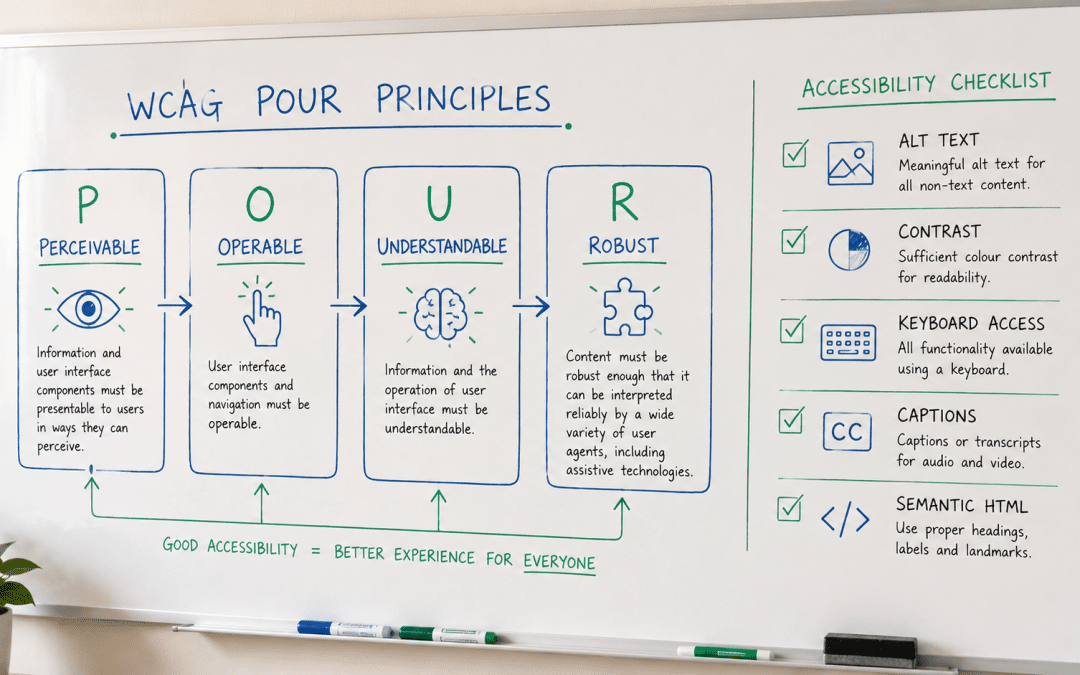
Web accessibility south africa means building sites that everyone can use, including people with visual, hearing, motor, or cognitive disabilities — and the recognised way to do it is to follow the WCAG standard at Level AA. It is part ethical duty, part commercial edge, and part legal risk-reduction. For the wider build context, see our web design guide; this page explains what WCAG means and how to make a site accessible.
The encouraging news is that accessibility is mostly good craft, not a separate discipline. Many of the things that make a site accessible — clear structure, readable text, proper labels — also make it better for every visitor and for search engines. Done from the start, it adds little cost; retrofitted later, it costs more, which is the case for building it in.
Quick Answer
Web accessibility means designing sites usable by people with disabilities, measured against the WCAG standard, with Level AA as the practical target most organisations aim for. In South Africa there is no ADA-style law forcing it on private business, but equality legislation and plain commercial sense both point the same way. The essentials — alt text, colour contrast, keyboard navigation, captions, and clean semantic HTML — also improve usability and SEO for everyone.
Want to know how accessible your site is right now? Let us check it for you.
Get a Free Accessibility CheckWhat Web Accessibility and WCAG Mean
Web accessibility is the practice of designing and building websites so that people with disabilities can perceive, navigate, and use them. That includes visitors who are blind or have low vision, who are deaf or hard of hearing, who cannot use a mouse, or who have cognitive differences — a far larger group than most businesses assume, given that roughly 16% of people live with some form of disability worldwide.
The global standard is the Web Content Accessibility Guidelines, known as WCAG and maintained by the W3C Web Accessibility Initiative (WAI). WCAG organises everything under four principles — that content must be Perceivable, Operable, Understandable, and Robust, often shortened to POUR — and sets testable success criteria at three conformance levels: A, AA, and AAA.
For nearly every business, Level AA is the target. Level A is the bare minimum and AAA is rarely achievable across a whole site, so AA is the level most organisations and policies aim for — comprehensive enough to be meaningful without being impractical. When people say a site is "WCAG compliant," they almost always mean it conforms to WCAG 2.2 at Level AA.
WCAG AA Is the Practical Standard
WCAG, maintained by the W3C, defines accessibility through four POUR principles and three levels — A, AA, and AAA. Level AA is the sweet spot almost every business should aim for: thorough enough to genuinely help disabled visitors, but realistic to achieve and maintain. Treat WCAG 2.2 AA as the working definition of an accessible site, and most of the important decisions follow from it.
Why Accessibility Matters for SA Businesses
Accessibility matters first because it widens your audience. With around one in six people living with a disability, an inaccessible site quietly turns away a significant share of potential customers — and their families and friends who shop with them. Accessible design is simply good business, opening the door to buyers an inaccessible site shuts out.
There is also a South African legal dimension, though it needs framing honestly. There is no ADA-style statute forcing private businesses to meet a specific web standard here, but the Constitution's equality guarantee and PEPUDA — the Promotion of Equality and Prevention of Unfair Discrimination Act — both prohibit unfair discrimination on the basis of disability. Building accessibly is the sensible, risk-reducing way to stay on the right side of that principle.
Finally, accessibility overlaps strongly with quality and search performance. The same semantic structure, alt text, and clear navigation that help assistive technology also help Google understand your site, so accessible sites tend to be better-built sites. Good accessibility is rarely a cost centre on its own — it travels with better usability and stronger technical SEO.
Curious whether accessibility gaps are costing you customers? Ask us to take a look.
Get a Free Accessibility ReviewWeb Accessibility South Africa: The Practical Checklist
The practical side of web accessibility south africa businesses can act on is a clear, achievable checklist rather than a specialist mystery. Start with the visual basics: descriptive alt text on every meaningful image, sufficient colour contrast between text and background (a ratio of at least 4.5:1 for normal text), and text that can be resized without breaking the layout.
Next comes operation and structure. The whole site should be usable by keyboard alone, with visible focus states so users can see where they are, and built on clean semantic HTML — real headings in order, proper lists, and labelled form fields — so screen readers can interpret it. Captions on video and transcripts for audio round out the essentials for hearing accessibility.
Where standard HTML is not enough, ARIA attributes can convey extra meaning to assistive technology, but they are a supplement, not a substitute for good structure. The guiding rule is simple: build with proper, semantic markup first, use ARIA only to fill genuine gaps, and test with a keyboard and a screen reader rather than assuming it works.
| Accessibility area | What to do | Helps |
|---|---|---|
| Images | Descriptive alt text | Blind / low-vision users |
| Colour | Contrast ratio 4.5:1+ | Low-vision users |
| Navigation | Full keyboard access + focus states | Motor-impaired users |
| Media | Captions and transcripts | Deaf / hard-of-hearing users |
| Structure | Semantic HTML + form labels | Screen-reader users |
Accessibility and SEO: The Overlap
One of the most useful things to understand is how much accessibility and search optimisation reinforce each other. Descriptive alt text helps screen-reader users and also tells Google what an image shows; a logical heading structure aids navigation for assistive technology and gives search engines a clear content outline. The work overlaps so heavily that improving one usually lifts the other.
Clean semantic markup, descriptive link text, captions and transcripts, and fast, well-structured pages all serve disabled users and search crawlers alike. That is why accessibility is rarely wasted effort — even setting the human case aside, it strengthens the technical foundation your rankings depend on. Building accessibly is, in practice, building well.
Accessibility and SEO Pull Together
Alt text, semantic headings, descriptive links, captions, and clean structure all help disabled visitors and search engines at the same time. Accessibility work is therefore rarely single-purpose — it doubles as technical SEO and general quality. That overlap is the strongest practical argument for building accessibly: you are not choosing between inclusion and performance, you are getting both from the same effort.
How to Make Your Site Accessible
Improving web accessibility south africa businesses can manage in stages, starting with the highest-impact, lowest-effort fixes. Add alt text to images, correct any low-contrast text, and make sure the site works with a keyboard — these three alone resolve a large share of common issues and require no redesign. From there, work through headings, form labels, and media captions methodically.
The most reliable approach is to audit against WCAG AA, fix issues in priority order, and then test with real assistive technology rather than trusting an automated scan score. Build accessibility into your ongoing process too — a quick check whenever new content or features go live — so the site stays conformant instead of slipping back. Treating it as a habit, not a one-off project, keeps a site usable as it grows.
Start With the Big Three
Alt text, colour contrast, and keyboard access resolve a large share of accessibility issues with no redesign — start there, then work through structure and media. Audit against WCAG AA, fix in priority order, and test with real assistive technology rather than a scan alone. Built into your routine, accessibility stays in place as the site grows rather than eroding.
A Real-World Example: Before and After
The clearest illustration is a representative SA business whose site was rebuilt with accessibility in mind — proper alt text, fixed colour contrast, full keyboard navigation, and semantic structure. Nothing about the brand changed, but the site became usable for visitors it had previously excluded, and its search performance improved as a side effect of the cleaner markup.
| Metric | Before — inaccessible site | After — WCAG AA-aligned site | Change |
|---|---|---|---|
| WCAG AA criteria met | Partial | Substantially met | Improved |
| Keyboard-only usability | Broken in places | Fully navigable | Resolved |
| Images with alt text | Under half | 100% | +100% |
| Addressable audience | Baseline | Meaningfully wider | Expanded |
| Technical SEO health | Average | Markedly stronger | Improved |
The alt-text row captures the double benefit neatly. Adding descriptive alternatives to every image made the site usable for screen-reader visitors and simultaneously gave search engines more to work with — a single change serving both inclusion and rankings. That pattern, repeated across the build, is why accessibility so often pays for itself.
The GPM Differentiator
Much of the advice on web accessibility south africa businesses encounter is either an alarmist "you'll be sued" pitch or a vague nod to "best practice" with no concrete steps. We come at it from an operator's seat, having built South African sites where accessibility, usability, and search all had to work together — so our web design services bake WCAG AA thinking in from the start rather than bolting it on after launch.
For clients that means honest, practical accessibility — real alt text, proper contrast, keyboard access, and clean semantic structure — framed by what genuinely helps users and what the law actually expects, not scare tactics. You get a site that is more inclusive, better built, and stronger for SEO, with a clear view of where it stands against WCAG AA and what, if anything, still needs attention.
Who This Is NOT For
This practical, build-it-in view of accessibility suits most businesses, but not everyone. Being clear about that upfront saves wasted effort — so here is who should read it differently.
Anyone wanting a one-line "accessibility widget" fix. Overlay plugins that promise instant compliance with a single script are widely criticised by accessibility experts and disabled users, and often make things worse. If you are hoping to tick the box without touching the build, this guide will disappoint — real accessibility lives in the site itself.
Organisations needing formal legal certification. If you require a signed conformance statement for procurement or regulatory reasons, you need a specialist accessibility audit and possibly legal advice beyond this overview. The principles here are sound, but a formal certification process has requirements that a general guide cannot stand in for.
Those treating accessibility as a one-time task. Accessibility erodes as content is added — a new image without alt text, a video without captions — so it needs ongoing attention, not a single pass. If nobody will maintain it after launch, the site will drift out of conformance regardless of how well it started.
Anyone unwilling to test with real assistive technology. Automated checkers catch only part of the picture; genuine accessibility needs keyboard and screen-reader testing. If you want to rely on a scan score alone and skip actual testing, you will miss the issues that matter most to the people accessibility is meant to serve.
Want an honest, practical accessibility review of your site? Start free.
Get a Free Accessibility CheckFrequently Asked Questions
What is WCAG and which level should I aim for?
WCAG — the Web Content Accessibility Guidelines, maintained by the W3C — is the international standard for web accessibility, organised under four principles (Perceivable, Operable, Understandable, Robust) with three levels: A, AA, and AAA. For almost every business, Level AA is the right target. It is thorough enough to genuinely help disabled visitors while remaining practical to achieve and maintain across a whole site.
Is web accessibility a legal requirement in South Africa?
There is no ADA-style law forcing private businesses to meet a specific web standard in South Africa, so it is not compliance in that strict sense. However, the Constitution's equality clause and PEPUDA prohibit unfair discrimination on the basis of disability, which creates a real expectation and risk backdrop. Building to WCAG AA is the sensible, defensible way to align with those principles and good practice.
How do I know if my website is accessible?
Start with automated checkers for an initial scan, but do not stop there — they catch only part of the picture. Real testing means navigating the whole site with a keyboard only, checking colour contrast, and trying a screen reader. A specialist accessibility audit against WCAG AA gives the fullest view, combining automated tools with the human testing that surfaces the issues that matter most.
Does accessibility actually help my SEO?
Yes, substantially. Many accessibility practices double as SEO best practice: descriptive alt text helps screen readers and search engines, semantic headings aid both navigation and crawling, and captions make video content indexable. Building accessibly tends to produce cleaner, better-structured pages that search engines understand more easily, so the two goals reinforce rather than compete with each other.
Are accessibility overlay widgets a good solution?
Generally no. Overlay tools that promise instant compliance with a single line of code are widely criticised by accessibility experts and disabled users, and they can introduce new problems while failing to fix underlying ones. Genuine accessibility comes from the site's own structure and content — proper markup, contrast, and keyboard support — not from a script layered on top after the fact.
How much does it cost to make a website accessible?
Building accessibility in from the start adds little to a project, because it is mostly good craft applied consistently. Retrofitting an existing site costs more, depending on how much needs fixing — but it is rarely as expensive as feared, and the gains in audience reach and SEO offset it. The most cost-effective path is always to build accessibly from the outset.
If you are unsure where your site stands on accessibility, that uncertainty is worth resolving — many businesses have no idea they are excluding visitors until someone checks. A straightforward review against WCAG AA usually makes the priorities clear, and the fixes are often more manageable and affordable than the topic's reputation suggests.
Get a Free Web Accessibility Check
Tell us about your site and we will review it against WCAG AA — alt text, contrast, keyboard access, structure, and media — and map the priorities that genuinely improve inclusion and SEO, as a one-page plan you own outright with no pressure. No obligation — we will get back to you within 24 hours.
Get My Free Accessibility Check