
 Add to Preferred Sources
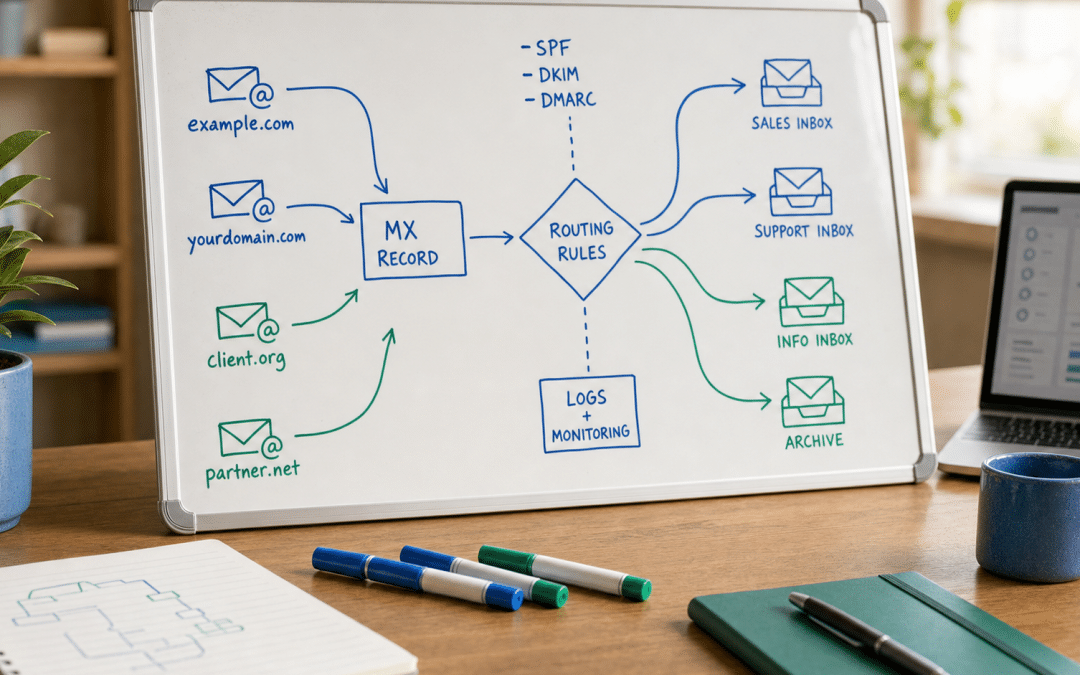
Google workspace catch all email is a routing rule in the Admin Console that redirects any message sent to a non-existent or misspelled address at your domain into a single designated mailbox — so no prospect's first enquiry bounces back unread. If your South African business runs a custom domain with more than one staff member, there is a meaningful chance a client will mistype an address at some point. Like other domain-level tools covered in the website builders South Africa cluster, this setting is administrative rather than technical: any account holder with Gmail Settings administrator privilege can turn it on today.
The setting lives inside Gmail routing in your Admin Console, not in individual user preferences. That placement matters because it operates at domain level — catch-all routing applies to every address your domain does not recognise, from "enquiries@" typed when the real address is "info@" to addresses belonging to staff who have since left. Paired with an email domain authentication setup that already has SPF, DKIM and DMARC in place, catch-all routing completes a resilient inbound email foundation.
One decision that trips up many SA operators is where to route catch-all mail: a single user mailbox, a dedicated catch-all account, or a Google Group. Each option carries different cost and access implications — the decision table below maps the right choice to your situation before you start configuring anything.
Quick Answer
Google workspace catch all email routes messages sent to non-existent addresses at your domain into a single designated inbox, preventing lost enquiries from typos or old staff addresses. Configure it in Admin Console → Apps → Google Workspace → Gmail → Routing, under the Default Routing section. No plan restriction is documented in Google's Admin Console help — the feature appears available on all plans including Business Starter, though Google has not published an explicit per-edition confirmation. Only Gmail Settings administrator privilege is required. Allow up to 24 hours for propagation, though changes typically take effect sooner.
Jump to:
Not sure which email routing setup fits your business?
Share your domain and team structure and we will map out the right routing configuration — no obligation, reply within 24 hours.
Get a free email setup reviewWhat Is a Catch-All Email Address in Google Workspace?
A catch-all email address in Google Workspace is a domain-level routing rule that delivers any google workspace misaddressed email — a message sent to a non-existent or inactive address at your domain — to a single designated inbox, preventing bounce-back rejections that would otherwise lose the message entirely.
Unlike a personal inbox filter, catch-all routing is a domain-wide Admin Console setting that your workspace administrator controls. It activates only for messages sent to addresses that do not currently exist on your account — active staff mailboxes and aliases are unaffected and continue to receive mail normally.
What catch-all routing captures
- Typos at the keyboard: infoo@yourdomain.co.za instead of info@
- Old staff addresses after account deletion or name changes
- Variations: enquiries@ when the active address is enquire@
- Addresses published on old printed materials or directories
What catch-all routing does NOT capture
- Mail to active, existing addresses (those deliver normally)
- Mail already blocked by Gmail's spam or phishing filters before routing applies
Which Google Workspace Plans Include Catch-All Routing?
Google's Admin Console documentation does not specify a plan restriction for catch-all routing — the feature appears accessible on all plans including Business Starter, though Google has not published explicit per-edition confirmation. Only Gmail Settings administrator privilege is required.
| Plan | Catch-all routing | Regular price (USD/user/month) |
|---|---|---|
| Business Starter | Available* | $7 |
| Business Standard | Available* | $14 |
| Business Plus | Available* | $22 |
| Enterprise | Available* | Custom |
* No plan restriction documented in Google's Admin Console help; Google has not published explicit per-edition confirmation. USD pricing per Google's official pricing page, October 2026. South African resellers bill in Rand; pricing varies by reseller and billing period. For a full comparison of cost and capability across platforms, see Google Workspace vs Microsoft 365 for SA businesses.
How to Set Up Google Workspace Catch All Email — Step by Step
Setting up google workspace catch all email requires only Gmail Settings administrator privilege in your Admin Console — no plan upgrade, no third-party tools. This Google Workspace email routing setup applies domain-wide and takes under 10 minutes to complete.
Before you start: choose your catch-all destination
Decide where misaddressed mail will land. Three destination types are supported:
- An existing user mailbox — easiest if one person (owner, admin, receptionist) will monitor catch-all mail. Uses an existing seat.
- A dedicated new user account — for example, catchall@yourdomain.co.za. Keeps catch-all mail separate from any individual's primary inbox but adds a user licence cost.
- A Google Group — best for teams: multiple people can see and respond to misaddressed messages. No additional licence cost if the group members already have Workspace accounts.
Step 1 — Sign in to the Admin Console
Go to admin.google.com and sign in with an account that has Gmail Settings administrator privilege.
Step 2 — Navigate to Routing
In the left menu, go to: Apps → Google Workspace → Gmail → Routing.
Step 3 — Open Google Workspace Default Routing
Scroll to the Default Routing section and click Configure (or Add another rule if a rule already exists). For the complete administrator reference, see Google's official catch-all mailbox guide.
Step 4 — Name the rule
Enter a descriptive name such as Catch-All Inbox. A name is required; the rule cannot be saved without it.
Step 5 — Set the trigger
Under Email messages to affect, check Inbound messages.
Step 6 — Set the action
Under For the above types of messages, do the following:
- Select Modify message
- Check Change envelope recipient
- Choose Replace recipient
- Enter the catch-all destination address you chose in the pre-start step
Step 7 — Select which accounts to affect
Click Show more options. Under account types:
- Check All inactive and unrecognised accounts
- Check Archive accounts with assigned delegate
- Leave Active user account and Group account unchecked (active addresses should receive mail normally)
Step 8 (Recommended) — Add a subject line prefix
Check the option to prepend a subject prefix and enter [Catch-All]. This makes routed messages immediately identifiable in a busy inbox and allows you to create a Gmail filter that moves them to a dedicated label.
Step 9 — Save
Scroll down and click Save. Google states propagation can take up to 24 hours, though changes typically take effect within a few hours.
Test before you trust it
From an external email account (not your domain), send a test message to a non-existent address at your domain — for example, test999@yourdomain.co.za. If catch-all routing is active, the message should arrive in your designated mailbox with the [Catch-All] prefix. If it does not arrive after 30 minutes, check that Gmail is active for your domain and that the destination address is correct before waiting out the full 24-hour propagation window.
Catch-All vs Email Aliases vs Google Groups — Which Is Right for Your SA Business?
Catch-all routing, email aliases and Google Groups solve different problems: catch-all handles unrecognised addresses, aliases give one person multiple addresses on your domain, and Google Groups let several people share a single inbox — and a business may need all three simultaneously.
| Situation | Best option | Why |
|---|---|---|
| Solo operator or founder-run business | Catch-all → existing inbox | No extra user cost; minimal setup |
| Role-based addresses (info@, sales@, support@) for one person | Aliases on the existing user | No extra seats; mail arrives at one inbox |
| Team that needs shared visibility on one address | Google Group or shared inbox | Multiple people can view and respond |
| Old staff addresses still receiving business enquiries | Catch-all or alias → replacement staff | Prevents lost handover mail |
| High-volume domain with many active users | Dedicated catch-all mailbox | Keeps monitoring manageable and separate |
For the alias versus shared mailbox decision in detail, see email alias vs shared mailbox for SA businesses. For managing a shared team inbox once routing is set, see the Google Workspace shared inbox guide.
When a Google Group is the better catch-all destination
If two or more people in your business need to see misaddressed messages — a support team, a reception desk, a small admin team — route catch-all to a Google Group rather than a single personal inbox. Group members can each see, reply to and assign messages, and the group adds no extra licence cost if members already have Workspace accounts. A personal inbox as catch-all destination means one person becomes the gatekeeper for everyone else's missed mail.
Keeping Your Catch-All Inbox Free of Spam
A catch-all mailbox attracts significantly more spam than a standard inbox because it accepts messages addressed to any address at your domain — the same mechanism that catches legitimate misaddressed mail also catches every unsolicited blast sent to guessed or scraped addresses.
Four steps to manage it without disabling the feature:
- Strengthen Gmail's spam filters for the catch-all account. In the Admin Console under Gmail → Spam, Phishing and Malware, enable enhanced pre-delivery message scanning and be aggressive with the safe senders list.
- Create a Gmail filter in the catch-all account that applies the label Catch-All to all messages with the [Catch-All] subject prefix you added during setup. Set the filter to skip the inbox — you review the label, not the inbox stream.
- Review on a schedule, not on notification. A catch-all inbox should be checked once or twice a day, not treated as a live notification channel. Turn off desktop alerts for the account and treat it like a triage queue.
- Keep your domain's sending authentication current. SPF, DKIM and DMARC records do not block inbound spam to your catch-all, but they protect your domain's sending reputation and reduce the likelihood that your catch-all address itself gets flagged as a spam source. See the email domain authentication checklist for the full setup.
Information governance note for SA businesses
SA businesses should confirm with their compliance officer whether a domain-wide catch-all creates access-control obligations under their internal information-governance policy. In practice: restrict the catch-all account to staff who need it, establish a clear process for responding to or forwarding messages, and avoid retaining enquiries longer than necessary. A catch-all mailbox with open access across the whole organisation is a straightforward governance gap to close at setup time.
Why South African Businesses Choose Growth Pulse Media
Growth Pulse Media's founder, Dirk van Greuning, built and scaled a large South African ecommerce business before founding the agency — which is the perspective behind the domain configuration and email setup guidance on this site.
The agency takes on a limited number of clients at a time, which means your domain, Google Workspace setup and website receive senior attention rather than being handed off to a coordinator. Whether you are setting up a new business domain, migrating existing email to Google Workspace, or building a web presence that needs to present your business professionally across every channel, GPM's web design service covers the full scope — from DNS configuration through to a finished, converting site.
All work is executed in-house from Johannesburg — no subcontracting, no offshore teams, no communication lag when something needs to be fixed on a Tuesday morning.
Who This Is NOT For
You only have a free Gmail account
Catch-all routing in the Admin Console requires Google Workspace with a verified custom domain. If your business email is yourname@gmail.com, this feature is not available to you — it is an organisational Admin Console setting, not a consumer Gmail feature. Setting up a custom business email address on Google Workspace is the prerequisite.
Your domain is already overwhelmed with spam
A catch-all will amplify the noise. If your existing mailboxes already receive high volumes of unsolicited mail, enabling catch-all will add every guessed and scraped address at your domain to the stream. Resolve the deliverability and spam filter issues first; catch-all second.
You need it to substitute for proper role mailboxes
If your business has five departments that each need professional addresses (accounts@, sales@, support@, hr@, info@), aliases or Google Groups are the right solution — not a single catch-all that one person has to triage. Catch-all is a safety net for unrecognised addresses, not a replacement for a deliberate address architecture.
Your sector restricts who can access communications
In regulated industries — financial services, legal, healthcare — routing all unrecognised domain mail to a single mailbox may create access-control issues under your own compliance policies, even if it does not violate POPIA directly. Check with your compliance officer before enabling a domain-wide catch-all on a regulated practice's email system.
Setting up Google Workspace for a new domain or business?
Tell us where you are starting from and we will outline the email configuration that fits your team size and sector — no obligation, and we will reply within 24 hours.
Start the conversationReady to get your website and email working together?
Send us your current setup — hosting, domain, email provider — and we will identify what is worth fixing now and what can wait. No obligation, reply within 24 hours.
Book a free setup auditFrequently Asked Questions
Does Google Workspace catch-all work on all plans?
Google's Admin Console documentation does not list a plan restriction for catch-all routing — it appears accessible on all plans including Business Starter, though Google has not published an explicit per-edition confirmation. Only Gmail Settings administrator privilege is required. The feature is configured at the domain level, not in individual user settings.
What happens to mail sent to a deleted staff member's address?
When a staff member's account is deleted, any mail sent to their old address will bounce unless you have catch-all routing enabled or have created an alias that forwards to their replacement. With catch-all active, those messages land in your designated catch-all inbox rather than being rejected and lost. It is one of the most common practical reasons SA businesses enable the feature after staff turnover.
Will enabling catch-all increase the spam I receive?
Yes, enabling catch-all typically increases the volume of spam and unsolicited mail to your designated inbox, because every message addressed to any address at your domain — including guessed or scraped ones — is now accepted rather than bounced. Strengthen Gmail's spam filters in the Admin Console, add a subject prefix so catch-all messages can be filtered into a separate label, and review the label on a schedule rather than treating it as a live inbox.
Can I use a Google Group as my catch-all destination?
Yes — and for most teams it is the better choice. A Google Group lets multiple people view, respond to and assign misaddressed messages without any one person becoming the sole gatekeeper. Create or select an existing group, then enter the group email address as the replacement recipient in your Default Routing rule. No additional licences are needed if the group members are already on your Workspace account.
How long does it take for catch-all routing to start working?
Google states that changes to Gmail routing settings can take up to 24 hours to propagate. In practice, the rule typically takes effect within a few hours. If your test message to a non-existent address does not arrive in the catch-all inbox within 30 minutes, wait before troubleshooting — the setting is likely still propagating rather than misconfigured.
Get Your Google Workspace Configuration Right — First Time
Growth Pulse Media configures Google Workspace domains for South African businesses, including catch-all routing, aliases, group inboxes, SPF/DKIM/DMARC authentication and DNS management. All work is executed in-house from Johannesburg — senior attention, no juniors, no offshore team. No obligation — we will get back to you within 24 hours.
Talk to us about your setup