
 Add to Preferred Sources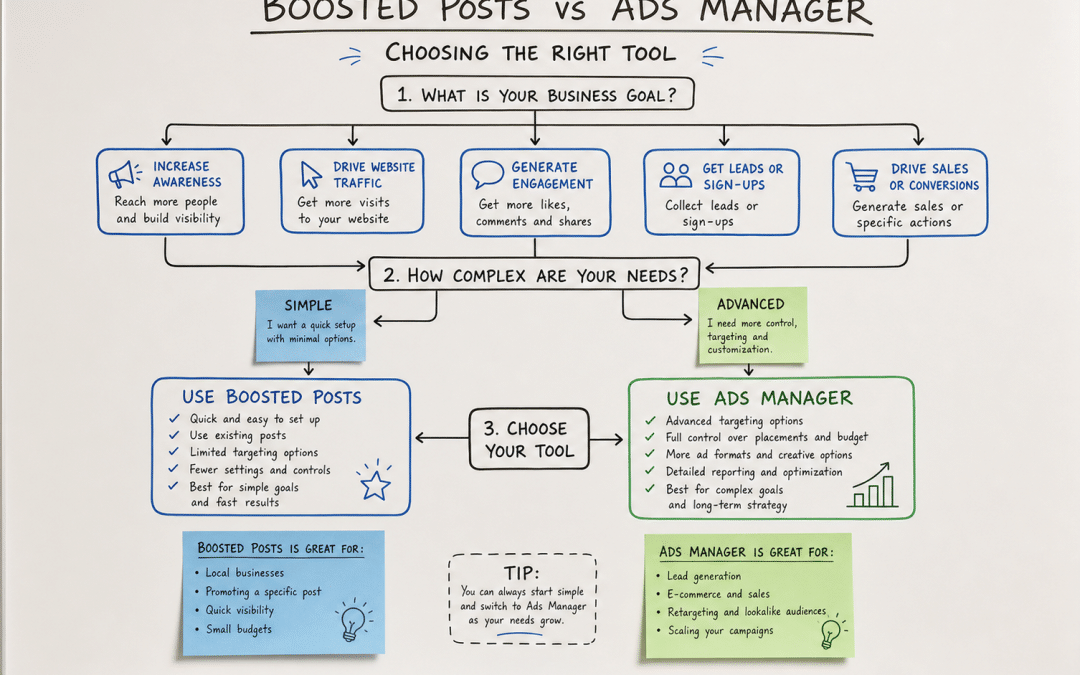
The choice between boosted posts vs ads manager is the single most budget-critical decision South African businesses make on Meta — and most get it wrong. South Africa has 27.9 million Facebook users, representing 61.7% of adults aged 18 and over, making Meta advertising in South Africa one of the highest-reach paid channels available to local businesses. Yet the majority of small and medium-sized businesses put money behind posts through the Boost button and wonder why the results look like engagement but feel like nothing.
This post maps exactly what separates the two tools, when each one is the right call, and where the money quietly disappears when the wrong choice gets made. If you want to benchmark what SA campaigns typically cost before choosing a tool, Meta Ads benchmarks for South Africa covers CPM, CPC and CTR ranges in detail.
Quick Answer
Boosted posts are a simplified way to put spend behind existing content — fast to set up, limited to engagement-style objectives, and restricted to feed placements with basic demographic targeting. Meta Ads Manager is the full campaign builder that unlocks all six advertising objectives (including Sales and Leads), custom and lookalike audiences, Stories and Reels placements, pixel-based conversion tracking, and A/B testing. When your goal is revenue or lead volume, boosted posts vs ads manager is not a close contest: Ads Manager wins. When your goal is amplifying a piece of content that already has organic traction, a boost can be a legitimate quick play.
Jump to a Section
Running ads but unsure which setup is right for your goals? Get a no-obligation Meta Ads assessment from GPM — we'll tell you honestly whether you need a rebuild or a tune-up.
What Is a Boosted Post on Facebook or Instagram?
A boosted post is a simplified paid promotion applied to content that already exists on your Facebook Page or Instagram profile. The setup takes two to three minutes: you select the post, choose a goal (reach, engagement, or link clicks), define a basic audience by age, gender, location and interests, set a daily or total budget, and confirm. Meta handles the rest.
The appeal is obvious. There is no campaign architecture to navigate, no pixel to configure, no creative to build from scratch. For a business owner squeezing marketing into a busy day, the Boost button feels like the path of least resistance. The problem is that the path leads somewhere Meta decides, not somewhere you choose.
Key Point
When you boost a post, Meta automatically optimises for engagement — reactions, comments, shares and link clicks — regardless of what your actual business goal is. If you are trying to drive purchases or capture leads, the algorithm is working against you from the moment you hit Confirm.
As of mid-2026, boosted posts are typically limited to feed placements — the Facebook desktop feed, the mobile feed, and the Instagram feed. Stories, Reels, Messenger, and the Audience Network are not available through the standard boost flow. You also cannot exclude existing customers, build a lookalike audience from your buyer list, or run a separate test to compare which creative drives more conversions in the standard boosted post interface.
What Is Meta Ads Manager?
Meta Ads Manager is the full campaign management interface where professional advertisers build, manage, and optimise paid campaigns across the entire Meta platform. Hootsuite describes it as "a fully customizable campaign built from the ground up" — you choose the objective first, then build everything else around that goal.
Under Meta's current ODAX (Outcome-Driven Ad Experiences) framework, Ads Manager offers six campaign objectives:
- Awareness — maximise reach and ad recall
- Traffic — drive clicks to your website, landing page, or app
- Engagement — messages, video views, post interactions
- Leads — collect contact details via Instant Forms, Messenger, or WhatsApp
- App Promotion — drive installs or in-app actions
- Sales — drive purchases, add-to-carts, and catalogue conversions
The objective you choose is locked at campaign creation because it changes how Meta's algorithm learns and optimises. Choose Sales, and every rand of budget goes toward finding people most likely to buy — not most likely to leave a like.
Ads Manager also opens targeting that is simply not available when boosting. You can upload a customer list and exclude those buyers from prospecting. You can build a lookalike audience from your highest-value customers and let Meta find more people who share their profile. You can retarget everyone who visited a product page but did not purchase. For ecommerce stores using Meta Pixel and product catalogues, Meta's Dynamic Product Audiences automatically show shoppers the exact products they browsed or added to cart — a capability that requires Ads Manager and cannot be replicated through boosting.
Boosted Posts vs Ads Manager: Key Differences at a Glance
| Feature | Boosted Post | Ads Manager Campaign | Best For |
|---|---|---|---|
| Setup time | 2–3 minutes (approx.) | 15–45 minutes approx. (first build) | Speed vs. control |
| Campaign objectives | Engagement / reach / link clicks | All 6: Awareness, Traffic, Engagement, Leads, App Promotion, Sales | Revenue goals → Ads Manager |
| Targeting depth | Age, location, interests | Custom audiences, lookalikes, retargeting, exclusion lists | Precision → Ads Manager |
| Ad placements | Feeds only | Feeds + Stories + Reels + Messenger + Audience Network | Wider reach → Ads Manager |
| Creative flexibility | Uses the existing post | Build from scratch, test multiple creatives | Testing → Ads Manager |
| Conversion tracking | Surface metrics only (reach, engagement) | Full pixel-based attribution, purchase tracking | ROI measurement → Ads Manager |
| A/B testing | Not available | Built in | Optimisation → Ads Manager |
| Budget control | Daily or total spend | Daily, lifetime, bid strategies, rules | Scaling → Ads Manager |
When Should South African Businesses Boost a Post?
Boosting is not always the wrong choice — it is the wrong default. There are specific situations where it is a legitimate tool.
Content with existing organic traction. A post that is already generating comments and shares has proved resonance. A small boost can amplify that signal to a wider audience without the overhead of a full campaign build. This is the scenario the Boost button was actually designed for.
Event awareness on a tight timeline. A Cape Town restaurant wants to promote a weekend special on Friday afternoon to the surrounding suburb. A Gauteng retailer wants to amplify a Heritage Day post that is already picking up organic reach. There is no time to set up pixel events or audience testing. A boosted post targeting the right suburb, age group, and interest is a practical call — expect reach and event interest, not trackable sales.
Brand content with a pure awareness goal. A video showcasing your process, a team post, or a customer story where the goal is purely reach and brand recall. If you have explicitly chosen engagement as the outcome and are not measuring purchase attribution, a boost is acceptable. The mistake is confusing "the post got seen" with "the campaign worked."
The honest ceiling: Even in the scenarios above, an Ads Manager Awareness or Engagement campaign would give you better placement options, stronger reporting, and the ability to exclude irrelevant audiences. Boosting remains a shortcut, and shortcuts carry a cost beyond budget.
When to Use Meta Ads Manager Instead
Use Ads Manager any time your business needs an outcome beyond someone seeing your post.
Lead generation. If you want contact details — names, email addresses, WhatsApp numbers — you need the Leads objective, Instant Forms, and the ability to connect that form data to your CRM. None of this is possible through a boosted post.
Ecommerce and product sales. The Sales objective tells Meta to find buyers, not scrollers. Combined with your Pixel and product catalogue, Ads Manager can automatically retarget visitors who viewed specific products, reached checkout, or purchased a complementary item. This kind of campaign architecture is what separates businesses growing on Meta from businesses spending on it.
Audience building and retargeting. If you want to build a warm audience from website visitors and then convert them with a follow-up campaign, you need custom audiences and the Pixel. Retargeting consistently produces among the strongest cost-per-acquisition results in mature Meta accounts — and it lives entirely inside Ads Manager.
Any campaign that needs to be measured against revenue. If you cannot see what a rand of ad spend produced in return, you cannot make a rational decision about whether to spend more or less. Ads Manager, with a properly configured Pixel and Conversions API, gives you that measurement. A boosted post gives you reach figures and a sense of activity.
The Rule of Thumb
If you can answer "yes" to any of the following, use Ads Manager: Do you want to track leads or purchases? Do you want to retarget website visitors? Do you want to exclude your existing customers from prospecting? Do you want to know what your cost per acquisition is? One yes is enough.
On budget scale: the Ads Manager learning curve is a real time cost. At very low spend levels where you cannot generate consistent weekly conversion signals, a properly structured Ads Manager campaign with the right objective gives the algorithm a sharper signal to work with than any boosted post can — and the gap between a well-run campaign and a sloppy one widens significantly as budget grows. The higher your monthly ad spend, the more the wrong tool costs you.
Already running boosted posts and not seeing the returns you expected? GPM rebuilds Meta campaigns on proper foundations — with the right objectives, the right audiences, and revenue as the metric that matters.
The Hidden Costs Most Businesses Miss
Budget waste on Meta does not always look like money burning. Sometimes it looks like engagement — and that is the most expensive version of getting this wrong.
Paying for engagement when you need sales. When Meta optimises a boosted post for engagement, it finds people who interact with content — not people who buy things. These two populations overlap, but they are not the same. A campaign that drives hundreds of reactions while generating no purchases is not a failed campaign in Meta's eyes. It delivered exactly what was asked. The wrong objective is your cost, not theirs.
The iOS 30% fee trap. Since February 2024, Apple has required Meta to apply a 30% service fee to any boosted post purchased through the iOS Facebook or Instagram app. Every rand you spend on a boosted post through the iOS app costs 30% more than the same spend made on desktop. This fee rolled out globally and applies to any in-app payment on iOS. The straightforward fix: always boost from the desktop version of Facebook or Instagram, or add funds to your Meta account through the mobile web browser rather than the app. This is a cost that hits boosters specifically — Ads Manager campaigns managed on desktop or through Business Manager are not affected in the same way.
No learning, no compounding. Ads Manager campaigns accumulate learning. As the pixel collects data on who converted, Meta's algorithm gets sharper at finding more people like them. Each boosted post campaign starts fresh — unlike a structured Ads Manager campaign, it does not accumulate a campaign learning history that the algorithm can refine and compound over time. Businesses that manage structured Ads Manager campaigns build that learning as an asset. Businesses that boost post-by-post rebuild the algorithm's understanding with each new post.
Practical note on ad spend: SA advertisers benefit from lower auction competition than Western markets, which generally means lower CPMs and CPCs than the global average. That advantage disappears quickly when budget is directed at the wrong objective. Clicks to an unqualified audience appear efficient on paper while producing no measurable return. See SA Meta Ads benchmarks for current CPM, CPC and CTR ranges.
Why South African Businesses Choose Growth Pulse Media for Meta Ads
Dirk built and scaled a South African ecommerce business before founding GPM — which means the team has paid the actual invoices, watched budgets evaporate on boosted posts, and rebuilt campaigns from properly instrumented foundations. That background shapes how every Meta account is managed.
GPM runs Meta campaigns exclusively through Ads Manager, never through the Boost button. Every campaign starts with the right objective for the business goal: Sales for ecommerce stores integrated with PayFast or Peach Payments, Leads for service businesses feeding into CRM and WhatsApp follow-up sequences, Awareness only when awareness is genuinely the goal with a defined measure of success. The Meta Pixel and Conversions API are configured from day one — without server-side tracking, attribution breaks the moment a customer changes devices or clears cookies.
GPM works with a deliberately limited number of clients. That is not a marketing line — it means senior attention on every account, not a junior account manager copy-pasting audiences from a template. If you are spending on Meta and wondering whether your structure is right, the GPM Meta Ads management service page explains the process and what proper campaign architecture looks like in practice.
For businesses in ecommerce, the approach includes audience segmentation across the full funnel: cold prospecting lookalikes from top purchasers, warm retargeting of cart abandoners, and exclusion of recent buyers to protect ROAS. For local service businesses, campaigns are geo-targeted to the right suburbs, connected to Meta's audience targeting tools, and measured by lead quality as well as volume.
Who This Approach Is NOT For
Businesses with no Meta Pixel installed. Ads Manager campaigns optimising for Sales or Leads require a working Pixel and, ideally, the Conversions API. If your website has neither, the Sales objective will not perform — the algorithm has no signal to learn from. You would need to install tracking before structured campaigns make sense. A qualified digital partner can do this in a single session; it is a prerequisite, not a blocker.
Brands that can only give five minutes a week to ad management. Ads Manager campaigns need active management — reviewing creative performance, adjusting bids as the learning phase completes, replacing fatigued ads before CTR collapses, and scaling budgets on what is working. If that attention is not available, a poorly managed Ads Manager account will underperform a well-selected boosted post. The tool is only as good as the hands running it.
Campaigns built purely to gather social proof before a product launch. If the specific goal is to accumulate visible reactions and comments on a piece of content so that the post looks active before a launch, boosting that content for engagement is an honest use of the tool. It is a narrow use case — and it should not be confused with advertising that builds your business — but it is a legitimate one.
Frequently Asked Questions
Is boosting a post the same as running a Facebook ad?
No. Boosting a post puts existing content in front of more people using a simplified interface with a narrow set of objectives. Running an ad in Ads Manager lets you choose from all six campaign objectives, build any audience type, access all placements, and measure detailed conversion outcomes. They share the same underlying ad auction, but the control — and therefore the results — are very different.
Can I retarget website visitors using a boosted post?
No. Retargeting requires a custom audience built from your Meta Pixel data, which is available inside Ads Manager but not through the standard boosted post flow. Boosted posts allow basic demographic and interest targeting, but do not support targeting people based on actions they took on your website in the standard boost interface. This is one of the most commercially significant limitations of boosting.
Why does my boosted post show lots of engagement but no sales?
Because boosting defaults to an engagement objective. Meta's algorithm is finding people likely to react, comment, or share — not people likely to buy. The post is doing exactly what it was told to do. To drive sales, you need a Sales objective campaign in Ads Manager, with your Pixel configured to track purchase events and a conversion-optimised landing page.
Does it cost more to use Ads Manager than to boost a post?
Minimum daily budgets are similar — both can start from a few rand per day. The difference is what that spend achieves. An Ads Manager Sales campaign with a properly configured audience will typically deliver far better cost per acquisition than a boosted post with an engagement objective and a broad audience, even at the same total budget. The management time is higher for Ads Manager, which is the real cost differential for businesses running campaigns themselves.
How do I avoid the Apple 30% fee on boosted posts?
Boost from a desktop browser (facebook.com or instagram.com) rather than through the iOS Facebook or Instagram app. You can also add prepaid funds to your Meta ad account via desktop or the mobile web — those funds can then be used to boost from any device, including iOS, without incurring Apple's service fee. Apple applies the 30% charge to in-app purchases made through iOS apps; the desktop route bypasses it entirely.
What should I set up before switching from boosted posts to Ads Manager campaigns?
Three things in order: install the Meta Pixel on your website and verify it is firing correctly; configure the Conversions API (or use a partner integration if your platform supports it) for server-side event tracking; and define your campaign objective clearly before you build. If your goal is sales, choose Sales. If it is leads, choose Leads. The objective drives everything the algorithm does — getting this right from the start is the difference between a campaign that learns and one that spends.
Ready to Stop Paying for Engagement and Start Measuring Revenue?
GPM runs Meta campaigns through Ads Manager from the first rand spent — right objective, right audience, Pixel and Conversions API in place. We work with South African ecommerce businesses on Shopify, WooCommerce and custom platforms, integrating with PayFast, Peach Payments, and local CRM tools. No obligation — we'll respond within 24 hours with an honest assessment of where your current Meta spend is going.
Get Your Meta Ads Assessment