
 Add to Preferred Sources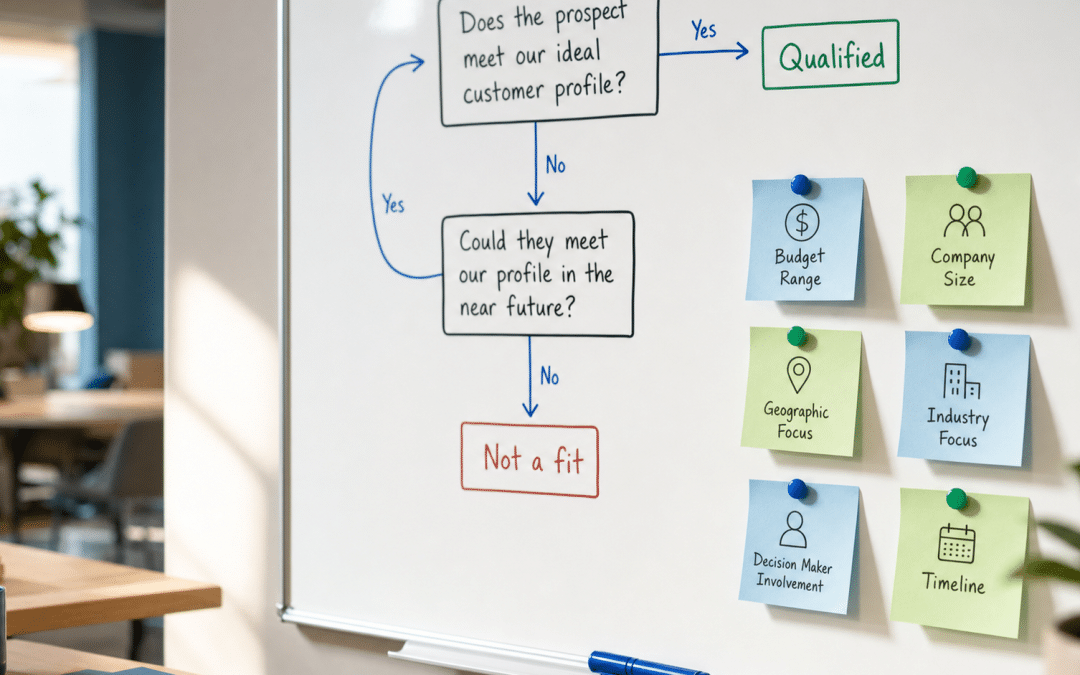
Meta lead form conditional logic is a branching feature inside Meta's instant forms that changes which questions a respondent sees based on their previous answers — and can close the form entirely when an answer rules them out as a prospect. For South African B2B operators running paid lead generation, it is the most direct way to stop paying a salesperson to disqualify people the algorithm should never have collected in the first place. A well-structured B2B lead generation campaign in South Africa needs more than cheap clicks — it needs a filter that operates before a form is submitted.
The core problem with Meta lead ads that skip this step is simple: instant forms with no qualifying logic accept every tap from every person who sees the ad. A Johannesburg commercial property firm targeting landlords does not want residential enquiries. A BEE consultancy serving enterprises does not want sole proprietors. Conditional logic places those filters at the point of submission — not at the point of callback, not in the CRM, and not during a wasted sales discovery call. South African operators running B2B lead generation campaigns on Meta encounter this problem in almost every unfiltered instant form build.
Quick Answer
Meta lead form conditional logic lets you branch instant form questions based on each answer, and route unqualified respondents to a "Close form" screen that excludes them from your leads entirely. Set it up in Ads Manager only — not in Business Suite or your Facebook Page — using Multiple Choice questions with per-answer routing rules: continue to a question, submit the form, or close the form. For SA B2B campaigns, the most effective approach layers conditional disqualifiers (budget, company size, decision-maker role) with the Higher Intent form type, then adds the Conversion Leads performance goal once you reach 200 qualified leads per month and have a CRM feeding downstream data back via Conversions API.
In This Guide
Are Your Meta Leads Costing More Than They're Worth?
Send us your current instant form setup and we will show you where unqualified prospects are slipping through before your first callback.
Send Us Your Current Form →What Is Meta Lead Form Conditional Logic?
Meta lead form conditional logic is the ability to show or hide questions in an instant form depending on how a respondent answered an earlier question — and, critically, to close the form entirely when that answer signals they are not a fit for your offer.
Without conditional logic, every respondent completes the same set of questions regardless of what they say. With it, a question such as "What is your monthly marketing budget?" can route respondents who select a budget below your minimum threshold to a polite close screen, while those selecting your target range continue to booking questions. The wrong people never reach your sales team; the right ones get a faster, more relevant experience.
The feature works exclusively through Multiple Choice question types. Inside each answer option, you assign a next step: go to a specific follow-up question, submit the form immediately, or close the form. The "Close form" action is the disqualifier — Meta counts that respondent as a non-lead and shows them a custom end screen you write. They do not appear in your leads download, your CRM sync, or your lead notifications.
A single instant form can contain up to 15 questions, but the more questions required, the higher the friction and the lower the completion rate. Most SA B2B campaigns achieve more targeted lead quality with two to four qualifying questions than with a long qualification checklist. The goal is to filter, not to conduct a full sales discovery inside a paid social ad.
Choosing Between the Three Instant Form Options
The form type you select controls how much friction exists before a respondent reaches your qualifying questions — which is why the choice matters before you layer conditional logic on top.
| Form Type | What It Adds | Placement Restriction | Best For |
|---|---|---|---|
| More Volume | Nothing — minimal friction, fastest submission | All placements | High-volume B2C; campaign warm-up data gathering |
| Higher Intent | A review screen where the respondent confirms their details before submitting | Facebook and Instagram feed (mobile only) | B2B qualification where contact accuracy matters |
| Rich Creative | Brand customisation — colour schemes, imagery, and product detail panels | Facebook mobile app only | Brand-forward campaigns needing visual differentiation |
For most SA B2B campaigns, the sequence is: start with More Volume to understand baseline cost per lead and lead mix, then switch to Higher Intent once you have enough data to see the quality difference downstream. The Higher Intent review screen adds one extra tap that filters out accidental and half-interested submissions without requiring any qualifying questions at all. Do not apply all friction layers at once — the algorithm needs submission volume to find patterns in your audience before you tighten the aperture.
Conditional logic works across all three form types, but pairs most efficiently with Higher Intent. The review step removes the most casual submitters; conditional questions then remove the wrong-fit submitters who make it through the review. Rich Creative is generally less relevant for SA B2B campaigns, which prioritise qualification over brand presentation at the lead capture stage.
Key Takeaway
Run More Volume first to generate initial data. Switch to Higher Intent when you can see who is actually converting downstream. Then add conditional qualifying questions. Each layer targets a different type of low-quality submission — applying all three simultaneously collapses volume before the algorithm has anything meaningful to learn from.
Qualifying Questions That Filter SA B2B Prospects
The conditional logic instant form questions you add are multiple-choice items designed to route the right respondents forward and close the form for the wrong ones — they should map directly to your minimum viable client profile, not to generic lead generation templates.
For South African B2B services, the most effective disqualifiers reflect criteria your sales team already uses. If you typically qualify by monthly budget, company headcount, decision-maker role, geographic location, or project timeline, those criteria belong in your form. The table below shows how common SA B2B qualification criteria translate into conditional questions with specific branching outcomes.
| Criterion | Sample Question | Qualifying Answer → Action | Disqualifying Answer → Action |
|---|---|---|---|
| Budget range | "What is your monthly budget for this service?" | At or above your minimum viable threshold → Continue to next question | Below your minimum threshold → Close form |
| Company size | "How many full-time employees does your business have?" | 50 or more → Continue | Fewer than 10 → Close form |
| Decision-maker role | "What is your role at the company?" | Director / MD / CEO / Owner → Submit form | Junior staff / Student / Not sure → Close form |
| Geographic location | "Where is your business based?" | Gauteng / Western Cape / KZN → Continue | Outside South Africa → Close form |
| Project timeline | "When are you looking to start?" | Within 3 months → Submit or continue | Just researching / No timeline yet → Route to resource end screen |
Keep your total form length under six questions where possible. Two or three well-chosen disqualifiers tend to produce better pipeline results than a long form with redundant fields. Practitioners report that adding two to four qualifying questions trims low-intent submissions by roughly 20%–30% in volume — the right respondents still convert, but the pipeline stops filling with people who are unlikely to answer a follow-up call.
Conditional logic can also route rather than disqualify. A commercial cleaning company targeting both office buildings and industrial facilities can ask "What type of premises do you operate?" and send each answer to a different follow-up question — the office-building group answers questions about square metres per floor; the industrial group answers questions about shift requirements. The lead is qualified and pre-routed before it reaches your CRM. This routing approach is particularly useful for SA businesses operating across multiple sectors or provinces, where a single flat form produces leads your team cannot action without ringing to ask the same questions the form should have captured.
Use the "Timeline" question thoughtfully. A respondent who selects "Just researching" is not necessarily worthless — route them to a custom end screen with a resource offer (a relevant guide or a blog post like progressive profiling for lead forms), and you convert a non-lead into a warm prospect without cluttering your active pipeline.
Disqualify, Route, or Advance — Your Three Branching Outcomes
Every answer on a conditional question inside a Meta instant form must map to one of three outcomes: advance to another question, submit the form immediately, or close the form for that respondent.
Go to a question sends the respondent to a specific follow-up question you define. Use this when an answer reveals important context but does not resolve qualification on its own — "Yes, I'm the decision-maker" logically leads to "What is your approximate monthly budget?" rather than immediate submission.
Submit form collects the respondent's contact information and ends the form on a custom thank-you screen. Use this when a combination of answers clearly qualifies the respondent — a confirmed MD at a 100-person company whose budget meets your minimum threshold does not need further questions before your team makes contact.
Close form removes the respondent from your leads entirely and shows them a custom end screen. Write the close screen message constructively — "This service is designed for businesses with 50 or more employees; check back if your team grows" keeps the brand relationship positive for respondents who do not qualify today. Meta counts closed respondents as non-leads: they do not appear in your leads download, your CRM sync, or your notification queue.
Key Takeaway
"Close form" is the most powerful quality lever in Meta's instant form builder. A respondent who reaches this screen costs you nothing in follow-up time, CRM clutter, or sales bandwidth. Write a meaningful close screen rather than a dead end — pointing someone toward a lower-tier offer or a useful resource preserves the relationship even when the form is correctly doing its job of keeping them out of your pipeline.
Training the Algorithm with Your CRM Data
Conditional logic filters the respondents you can see at the moment of submission; Conversions API integration filters the respondents Meta's algorithm selects before it ever shows them your ad.
These two quality layers operate at different stages of the same funnel. Conditional logic stops wrong-fit respondents at the form. Conversions API (CAPI) integration tells Meta which submitted leads became actual qualified opportunities or customers — teaching the algorithm to find more people with that profile and fewer people who fill in forms and never respond.
The Conversion Leads performance goal is the mechanism that uses this CRM signal. To activate it, connect your CRM to Meta via the Conversions API, then pass downstream events — "qualified lead", "opportunity created", "appointment booked" — back to Meta within 28 days of the original form submission. The goal has specific requirements: at least 200 leads per month flowing through the campaign, a conversion rate from submission to your target stage of between 1% and 40%, and the CRM event firing within the 28-day window.
According to Meta's own published case data, campaigns using the Conversion Leads goal alongside CAPI integration saw an average 15% lower cost per quality lead compared to standard leads optimisation. Individual results vary depending on industry, audience size, and CRM data quality — but the mechanism is clear: without downstream signal, the algorithm optimises for raw form submissions, not pipeline. A well-configured CRM integrated with your lead generation pipeline is what makes the Conversion Leads goal viable.
The SA Digital Cost Index (SADCI) records an average Meta CPC of R5.12 (range R2.86–R7.39, SADCI observation Aug 2026, at the index assumption of R16.42/USD) for SA-targeted campaigns — roughly 71% below the global average. At South African click costs, even a modest shift in qualified-lead rate rather than raw volume changes the campaign economics meaningfully. Track cost per qualified lead, not cost per lead submitted, to measure the actual return. Our SA cost per lead benchmarks by channel show how Meta compares to other acquisition sources.
Key Takeaway
Conditional logic and CAPI integration are complementary, not interchangeable. Use conditional logic to stop the wrong leads at submission. Use CAPI integration to teach the algorithm to find fewer wrong leads in the first place. The Conversion Leads goal requires 200 leads per month and CRM events within 28 days to work — below that threshold, optimise for standard leads with conditional disqualifiers only, and add the CAPI layer once volume supports it.
POPIA Obligations When Collecting Prospect Data via Paid Social
Collecting personal information through a Meta instant form is an act of data processing under POPIA, and how you intend to follow up with those respondents determines which additional obligations apply.
Data collected through an enquiry form — name, company, phone number, email address — can typically be processed under POPIA on grounds that include contractual necessity (the respondent is requesting contact about a service) or legitimate interests. These grounds do not require a separate consent tick-box for the collection itself. The respondent must, however, be informed of who is collecting their data, for what purpose, and that they have the right to object — which the instant form's mandatory disclaimer field is designed to handle.
A separate obligation applies when you plan to follow up with electronic marketing communications. POPIA's direct marketing rules prohibit sending marketing emails, SMS messages, or automated calls unless the respondent has given prior consent or is an existing customer who meets the conditions for the existing-customer exception. The Information Regulator's December 2024 guidance note on direct marketing confirms this applies to email, SMS, automated calls, and telephone calls.
Practical steps for SA B2B operators using Meta instant forms:
- Use the form's disclaimer field to explain what data is collected and for what purpose, and to inform respondents of their right to object.
- Add a specific consent statement for marketing communications if you plan to follow up with promotional emails or SMS after the form submission. The consent must be specific to that purpose — not bundled into a general terms reference.
- Do not use pre-ticked boxes. POPIA requires consent to be voluntary, specific, and informed. A pre-ticked agreement does not meet that standard.
- Include an opt-out mechanism in every marketing communication you send following form submission.
The Information Regulator's December 2024 guidance does not specifically address whether business email addresses are treated differently from personal email addresses. Do not assume a B2B exemption — the safer position is to collect specific consent for electronic direct marketing regardless of whether the email address is corporate or personal. For a broader picture of compliant paid social acquisition in South Africa, the post on POPIA-compliant lead generation covers the full framework.
Not Sure If Your Instant Form Is POPIA-Compliant?
Tell us about your current campaign structure and we will review your form flow, consent language, and CRM handoff against current SA obligations.
Request a Compliance Review →Why B2B Operators in South Africa Work With Growth Pulse Media
Growth Pulse Media is run by Dirk van Greuning, who built and scaled a large South African ecommerce business before founding the agency. That operator background means every campaign recommendation is evaluated against pipeline value, not impression counts.
Work is executed in-house. Growth Pulse Media carries a deliberately limited client load so that senior-level attention applies to every campaign build, not just the initial strategy. When a Meta instant form sequence is configured for a B2B client, the form architecture, conditional logic setup, CRM connection, and ongoing optimisation happen under the same hands — not outsourced to a junior team following a checklist.
The B2B lead generation services Growth Pulse Media offers in South Africa are built on the same three-layer approach described in this guide: form type selection, conditional qualifying logic, and downstream CRM signal through the Conversions API. The configuration is done against each client's specific qualification criteria, industry context, and minimum viable deal size — not imported from a global playbook.
Who This Approach Is NOT Right For
Ready to Configure a Qualifying Form for Your Next SA B2B Campaign?
Book a short audit call and we will map out the right conditional logic sequence for your offer, audience, and minimum viable client profile — no obligation.
Book a Form Audit →Frequently Asked Questions
What is conditional logic in Meta instant forms and how does it work?
Conditional logic in Meta instant forms allows each answer on a multiple-choice question to trigger a different next step: advance to another question, submit the form, or close the form and exclude that respondent from your leads. The feature is configured at the answer level inside Ads Manager, giving each respondent a different path through the form based on their previous replies. Unqualified respondents are filtered out automatically — your sales team never receives a callback request from someone who would have been disqualified in the first 30 seconds of a call.
Can conditional logic automatically disqualify leads in Meta ads?
Yes. The "Close form" action on any answer in a conditional question tells Meta to exclude that respondent from your leads entirely. Meta counts the person as a non-lead and shows them a custom end-screen message you write. They do not appear in your leads download, your CRM sync, or your notification queue. Writing a constructive close screen — "This service is for businesses with 50 or more employees" — keeps the relationship intact even when the campaign is correctly doing its filtering job.
Which question type enables branching in Meta instant forms?
Only Multiple Choice questions support conditional branching in Meta instant forms. Short Answer questions do not trigger branching logic. Inside Ads Manager, when you select a Multiple Choice question and enable the conditional logic toggle, you can assign a different next step to each answer option. A single instant form can contain a maximum of 15 questions total; keep a B2B qualification flow to the questions you will actually use to route or reject a lead.
Does conditional logic work in Meta Business Suite or on my Facebook Page?
No. Conditional logic — along with other advanced features such as rich creative and lead filtering — is only available when you create the instant form directly inside Meta Ads Manager. If you create your form from the Facebook Page interface or through Meta Business Suite, the branching options are not available. This is one of the most common reasons SA advertisers miss the feature: the form is built in the wrong environment.
How does POPIA apply to data collected through Meta instant forms in South Africa?
Collecting personal information through a Meta instant form is processing under POPIA, and section 11 sets the lawful grounds for it. The enquiry itself can typically be processed on grounds such as contractual necessity without a separate consent tick-box. However, section 69(1) requires prior consent — or the existing-customer exception under s69(3) — before you send follow-up marketing emails, SMS, or automated calls. The Information Regulator's December 2024 guidance note confirms this requirement applies to electronic direct marketing. Include a specific opt-in statement in the form's disclaimer field for any planned marketing follow-up, and do not use pre-ticked boxes.
Build a Meta Instant Form That Filters and Qualifies Before the First Callback
Growth Pulse Media configures Meta lead campaigns with conditional logic, Conversions API integration, and POPIA-compliant consent flows for South African B2B businesses. All configuration is done in-house — no juniors, no imported templates. We work with local CRM platforms including HubSpot and Zoho, and we calibrate qualifying questions against your specific SA market segment and minimum viable deal size.
No obligation — we will get back to you within 24 hours.
Get a Free Lead Form Assessment →