
 Add to Preferred Sources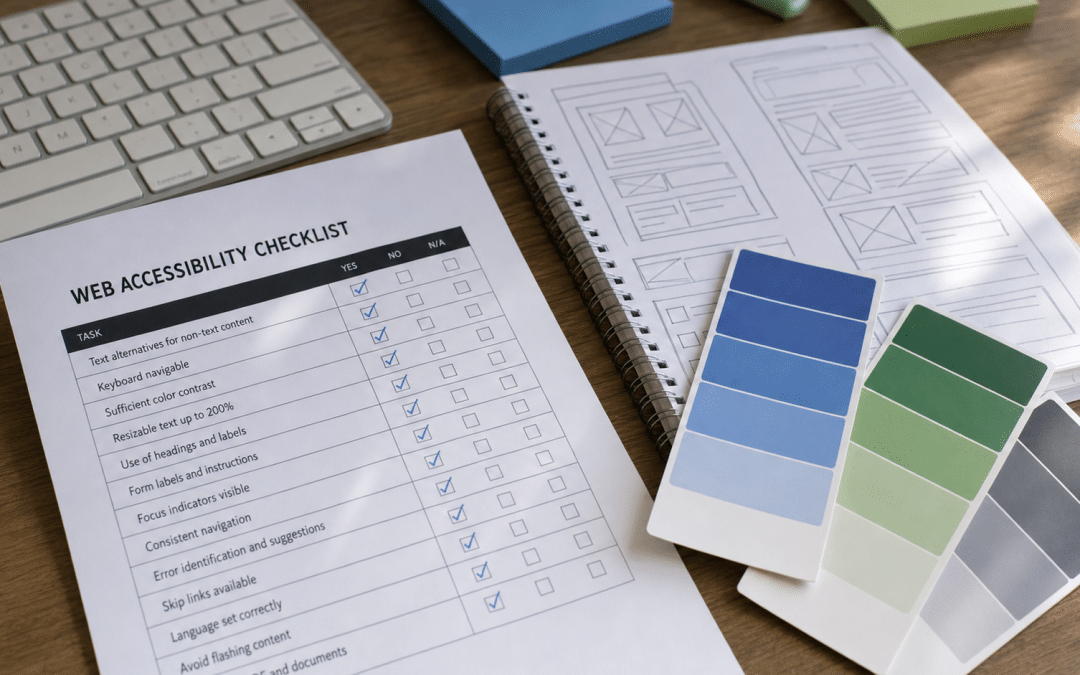
A website accessibility checklist south africa is a structured set of tests that tells you whether your site can be used by people with visual, motor, auditory, or cognitive disabilities — and whether it meets the international Web Content Accessibility Guidelines (WCAG) that South African government guidance now references directly. If you are investing in professional web design, accessibility is not a luxury add-on: the same legal frameworks that protect disabled South Africans offline — PEPUDA, the RPDA and the Constitution — extend to digital platforms, and building it in from the start costs a fraction of retrofitting it later.
The stakes are real. Statistics South Africa's 2022 Census counted approximately 3.3 million South Africans living with disabilities — people who rely on screen readers, keyboard navigation, and correctly structured content to use the web. At the same time, the broader compliance picture for SA websites has grown more complex, with POPIA requirements and non-discrimination obligations all intersecting. Getting accessibility right is one area where legal risk reduction and a better user experience are the same project.
Quick Answer
A practical website accessibility checklist south africa covers four WCAG areas: Perceivable (images have alt text, videos have captions, contrast is sufficient), Operable (all functions work by keyboard, skip navigation is present), Understandable (page language is declared, forms have labels, errors are described), and Robust (HTML is valid, ARIA roles are correct). South Africa's GCIS recommends WCAG 2.2 Level A as the minimum for government websites; private businesses should target Level AA to reduce risk under PEPUDA and the RPDA. Professional audits run approximately R20,000–R44,000 (international rates converted at R16/USD; SA specialists may price differently); SA developer rates of R350–R1,200 per hour apply to remediation.
On This Page
Not Sure If Your Site Passes the Basic Checks?
Send us your URL and we will run a structured accessibility review against the six most common WCAG failures — showing you exactly what needs to change and in what order.
Request a Free Accessibility ReviewWhy Website Accessibility Matters for South African Businesses
Website accessibility matters for South African businesses because approximately 3.3 million South Africans live with disabilities, non-discrimination legislation under PEPUDA and the RPDA extends to online services, and every visitor turned away by an inaccessible site is a potential customer a competitor will serve instead.
The numbers make this concrete. Statistics South Africa's 2022 Census found approximately 3.3 million South Africans living with some form of disability — around 6% of the population using the UN measurement standard. Many more South Africans temporarily experience accessibility barriers: an arm in a cast, outdoor glare on a phone screen, an older relative reading on a low-resolution tablet. Accessible design benefits everyone, not just users with permanent disabilities.
Beyond audience reach, the global evidence on how well websites actually perform on accessibility is sobering. The 2026 WebAIM Million report — which analyses accessibility on the top 1 million home pages on the web — found that 95.9% of those pages had detectable WCAG 2 failures, averaging 56.1 errors per page. Most of those failures are concentrated in just six recurring problem types, which means a focused remediation effort can clear the majority of issues without rebuilding your site.
The Business Case in Three Points
Broader audience: 3.3 million South Africans live with disabilities (Stats SA 2022). Accessible sites also load faster and behave more predictably on older devices — important in a market where many users are on low-end Android handsets.
Legal risk reduction: PEPUDA, the RPDA and the Constitution all create grounds for discrimination claims when websites exclude disabled users. No enforcement action means no precedent yet — not no risk.
Technical quality signal: Accessible HTML is clean, semantic HTML. It structures content the way search engines and AI crawlers also read it, which means accessibility work and Core Web Vitals improvements often overlap.
What Laws Apply to Website Accessibility in South Africa?
South Africa does not have a single dedicated statute mandating WCAG compliance for private websites. What it has is a layered framework of constitutional and legislative rights that extend to digital platforms — and that framework creates genuine legal exposure for organisations whose websites systematically exclude disabled users.
The Four Legal Pillars
- The Constitution (Section 9): The equality clause prohibits discrimination on grounds including disability. Constitutional principles of equality and dignity extend to the digital sphere — online services are not exempt.
- PEPUDA (Act 4 of 2000): The Promotion of Equality and Prevention of Unfair Discrimination Act binds the state and all private persons. It explicitly lists disability as a prohibited ground and applies to services — which includes online services.
- The Rights of Persons with Disabilities Act (RPDA): Reinforces that digital content must be accessible, and that "equal access to information and communication technologies" is a protected right.
- CRPD: South Africa has ratified the UN Convention on the Rights of Persons with Disabilities, which requires states to ensure equal access to ICT infrastructure and services.
In practice, no SA court has yet issued a landmark ruling specifically on website inaccessibility. But precedent is forming internationally, and the absence of a fine today does not mean the risk is theoretical. The more actionable standard is the Government Communication and Information System (GCIS) guidance, which formally recommends that South African government websites conform to WCAG 2.2 Level A as a minimum — with Level AA as best practice. Private businesses that mirror that standard sit in a defensible position regardless of how domestic case law develops.
The Website Accessibility Checklist South Africa: WCAG by Principle
WCAG organises its requirements around four principles — Perceivable, Operable, Understandable, and Robust (POUR). Every success criterion in WCAG 2.1 and 2.2 maps to one of these four areas. Use the table below as your working website accessibility checklist south africa audit tool: go through each area with your developer, note whether you pass or fail, and track remediation progress against the items marked Priority.
| Principle | Requirement | Level | Quick Test |
|---|---|---|---|
| Perceivable | All images have descriptive alt text (or empty alt="" for decorative images) | A ★ | Inspect element → check alt attribute on every <img> |
| Perceivable | Videos have captions; audio has a transcript | A ★ | Play a video with sound off — can you follow it? |
| Perceivable | Text contrast ratio is at least 4.5:1 against background (3:1 for large text) | AA ★ | Run WebAIM Contrast Checker on body text and headings |
| Perceivable | Content does not rely on colour alone to convey meaning | A | View page in greyscale — is all information still clear? |
| Perceivable | Text can be resized to 200% without loss of content or functionality | AA | Browser zoom to 200%, check for horizontal scroll or overlapping text |
| Operable | All functionality is available via keyboard (Tab, Enter, Arrow keys) | A ★ | Unplug the mouse and navigate the entire site using Tab only |
| Operable | A visible keyboard focus indicator is present at all times | AA | Tab through the page — if you cannot see where you are, it fails |
| Operable | Skip navigation link at page top lets users bypass repeated content | A | Press Tab on page load — the first option should be "Skip to main content" |
| Operable | No content flashes more than 3 times per second | A | Scan for animations or auto-playing banners with strobing effects |
| Operable | Page titles are descriptive and unique | A | Check <title> tag — each page should identify itself without ambiguity |
| Understandable | Page language is declared in the HTML <html lang="en"> attribute | A ★ | View page source, check first line for lang attribute |
| Understandable | All form fields have visible, programmatically associated labels | A ★ | Click a form label — does the cursor jump to the correct field? |
| Understandable | Error messages identify the field and describe what is wrong | A | Submit a form with errors — does it say "Email required" or just show a red border? |
| Understandable | Navigation and interface elements behave consistently across pages | AA | Check that the menu and search bar are in the same location on every page |
| Robust | HTML is valid and uses semantic elements (header, nav, main, footer) | A ★ | Run the W3C HTML Validator — fix errors affecting screen reader parsing |
| Robust | All links have descriptive anchor text (not "click here" or "read more") | A ★ | Extract all link text in isolation — do they make sense without surrounding copy? |
| Robust | Interactive components expose correct ARIA name, role, and value | A | Test with NVDA (Windows) or VoiceOver (Mac/iOS) — announce each control |
| Robust | Buttons are actual <button> elements, not styled <div> or <span> tags | A ★ | Inspect your primary CTA — is it a <button> or a <div> styled to look like one? |
Items marked ★ are either among the six most common WCAG failures globally (WebAIM 2026) or are fast to test and directly affect screen reader users. Fix these first.
The Six Most Common WCAG Failures — Fix These First
The 2026 WebAIM Million report found that just six failure categories account for 96% of all automatically detected accessibility errors across one million websites. If your site clears these six, you are already ahead of the overwhelming majority of SA businesses.
| Failure Type | % of Pages Affected (2026) | Fix Complexity | How to Fix |
|---|---|---|---|
| Low contrast text | 83.9% | Low | Adjust text/background colour pairs to meet 4.5:1 ratio — a designer or CSS change, not a rebuild |
| Missing image alt text | 53.1% | Low | Add a descriptive alt attribute to every informational image; use alt="" for decorative images |
| Missing form input labels | 51.0% | Low–Medium | Associate a visible <label> element with every input field using the "for" attribute |
| Empty links (links with no text) | 46.3% | Low | Add descriptive anchor text or, for icon links, an aria-label attribute |
| Empty buttons (no label) | 30.6% | Low | Add visible text or an aria-label to every button — especially hamburger menu and search icons |
| Missing document language | 13.5% | Very Low | Add lang="en" (or "af", "zu" etc.) to the opening <html> tag — a one-line fix |
Quick Win: Start With Your <html> Tag
Missing the lang attribute on your <html> tag is the most embarrassing WCAG failure — it affects 13.5% of the world's top sites, it takes one line to fix, and it immediately helps screen readers announce content in the correct language. If you do nothing else today, open your page source and check it exists.
What Does Website Accessibility Cost in South Africa?
Website accessibility costs in South Africa split into two phases — a professional audit to find the problems, and developer remediation to fix them. Applying the website accessibility checklist south africa to your site first produces a prioritised findings list, which scopes the remediation accurately.
Accessibility Audits
A professional manual audit is more reliable than automated scanning alone — automated tools catch a significant portion of WCAG failures, particularly structural issues like missing alt text and absent lang attributes, but keyboard navigation gaps, focus order problems, and screen reader announcement errors require a human tester with assistive technology. International specialist firms charge $1,250–$2,750 for a manual audit covering 5–10 primary pages (approximately R20,000–R44,000 at the August 2026 exchange rate of roughly R16 per USD). This is an international benchmark; SA-based specialists may price differently depending on the scope and tools used.
For smaller SA businesses, a hybrid approach — automated tool scan plus manual review of key templates — costs significantly less and catches the majority of impactful issues. The six failures above can all be identified during a structured half-day review by any competent web developer familiar with WCAG.
Remediation by South African Developers
SA freelance developers charge R350–R900 per hour; agencies typically bill at R450–R1,200 per hour. For a site with minor accessibility gaps — primarily contrast fixes, alt text, and label corrections — a competent developer can work through most issues in a day or two. Sites built on inaccessible frameworks, with hardcoded colour schemes and unsemantic HTML, need longer: expect a scoped quote before committing to a number.
| Work Type | Typical Scope | Indicative SA Cost |
|---|---|---|
| Automated accessibility scan | Whole site crawl, report output | From free (Lighthouse/WAVE) to a few thousand Rand for a specialist tool subscription |
| Manual audit (hybrid) | 5–10 key templates, screen reader testing | Based on SA developer rates of R350–R900/hr (freelancer) or R450–R1,200/hr (agency); scope and quote before committing |
| Quick wins only (contrast, alt, labels, lang) | Six most common failures on an existing site | Typically a few hours of developer time at SA rates; simpler on cleaner codebases |
| Full remediation (semantic HTML, ARIA, keyboard nav) | Complete WCAG 2.1 AA compliance, all templates | Requires scoped quote; varies widely by site complexity and existing code quality |
| Built-in from project start | Accessibility included in a new website redesign brief | Consistently less expensive than retrofitting an existing site; discuss as part of the initial design brief |
The Cheapest Option: Build It In
Adding WCAG compliance during a new build or responsive redesign costs a fraction of retrofitting it into an existing site. If you are already planning a rebuild, include accessibility requirements in the brief from day one — it's the same hour of developer time at the design stage versus days of rework post-launch.
Planning a Rebuild or Not Sure Where to Start?
Tell us your current platform and we will assess whether accessibility can be added to your existing site or whether a redesign is the cleaner path — no commitment required.
Get a Timeline and Fit AssessmentWhy South African Businesses Choose Growth Pulse Media
Growth Pulse Media was built by someone who has run SA business operations, paid local invoices, and dealt with the real constraints of the SA market — limited dev resources, budget-sensitive clients, and a customer base on everything from flagship Samsung devices to entry-level handsets on mobile data. That context shapes how we approach web design for South African businesses: accessible, fast, and built to convert, not to win awards.
When we build or audit a website, accessibility is part of the brief by default — not a line item you discover on the final invoice. We test keyboard navigation, run screen reader checks on primary templates, and flag contrast failures before a designer finalises the brand palette. We keep a deliberately limited client load so every project gets senior attention rather than being handed to a junior team with a checklist.
Our tech stack knowledge covers WordPress, WooCommerce, Shopify, and custom builds — which means we know exactly where each platform's default themes fall short on accessibility (WordPress themes often have unsemantic heading hierarchies; Shopify themes sometimes miss focus indicators on custom buttons). We fix those specifics, not generic issues from a generic audit.
Who This Checklist Is NOT For
Brochure sites with no budget for dev work. If you are running a static brochure site and cannot allocate any developer hours, the checklist identifies your problems but does not fix them. Accessibility requires actual code changes — there is no plugin that makes an inaccessible site accessible without touching the underlying HTML.
Teams looking for a once-and-done certification. WCAG compliance is not a certificate you hang on a wall. Content changes, new features ship, third-party widgets break things. Accessibility requires ongoing review — quarterly for active sites, annual minimum for low-update sites.
Businesses that outsource all digital work overseas. SA accessibility work needs to account for local language variants (Afrikaans, Zulu, Xhosa, Sotho), local assistive tech use patterns, and GCIS compliance standards — context that an offshore agency without SA market experience may not prioritise correctly.
Sites in active technical debt with no refactor planned. If your site runs on a heavily customised, older framework with hardcoded styles and unsemantic markup throughout, a WCAG remediation on top of it is expensive duct tape. In this scenario, the honest answer is that a new build is usually the more cost-effective path.
Want an Honest Assessment of Your Site's Accessibility Gap?
Share your URL and primary page templates and we will run a structured accessibility audit — showing you whether quick fixes are enough or whether a broader redesign makes more economic sense.
Request an Accessibility AuditFrequently Asked Questions
Is there a legal requirement for website accessibility in South Africa?
South Africa does not have a single dedicated law mandating website accessibility for private businesses. However, PEPUDA (the Promotion of Equality and Prevention of Unfair Discrimination Act, No. 4 of 2000), the Rights of Persons with Disabilities Act, and the Constitution's equality clause all apply to digital services and create grounds for discrimination claims. The Government Communication and Information System (GCIS) formally recommends WCAG 2.2 Level A as the minimum standard for government websites. Private businesses that adopt the same standard are in a significantly more defensible position.
What WCAG level should a South African business website target?
Target WCAG 2.1 Level AA as your working standard. Level A is the absolute minimum and covers only the most critical barriers. Level AA adds important requirements like colour contrast ratios and keyboard focus visibility that make a genuine difference for users with disabilities. Level AAA is aspirational for most commercial sites — many criteria are context-specific and difficult to achieve universally. The GCIS recommends at least Level A for government sites with Level AA as best practice; commercial sites should aim directly for AA.
Can automated tools test for website accessibility south africa compliance?
Automated tools like Google Lighthouse, WAVE, and axe DevTools catch a significant portion of WCAG failures — primarily structural issues like missing alt text, absent lang attributes, and low contrast text. The remaining failures — keyboard traps, screen reader announcements, logical focus order, meaningful error messages — require manual testing by a developer or accessibility specialist who actually navigates the site using assistive technology. Use automated tools as a first pass and triage mechanism, not a compliance certificate.
How long does it take to make a website WCAG compliant?
For a site with minor existing issues (primarily contrast, alt text, and labels), a competent developer working through the six most common failures can clear the majority in one to two days of focused work. For sites with structural accessibility problems — unsemantic HTML, inaccessible custom components, or keyboard navigation gaps — timelines vary significantly by site size and complexity. Including accessibility requirements in a new build brief from day one is the fastest path: building correctly takes far less time than retrofitting.
Does website accessibility affect SEO in South Africa?
Directly, accessibility is not a confirmed Google ranking signal. Indirectly, accessible sites align more directly with several factors that matter for SEO: clean semantic HTML is easier for crawlers to parse, descriptive alt text contributes to image search, clear page structure supports Core Web Vitals, and a better user experience reduces bounce rates. A well-built accessible site and a well-built SEO-optimised site look almost identical under the hood — the disciplines reinforce each other.
Build a Website That Works for Every South African Visitor
Growth Pulse Media builds and audits websites against WCAG standards for SA businesses — with senior developers who understand local platforms (WordPress, WooCommerce, Shopify), SA compliance requirements, and the real-world constraints of the SA market. No overseas handoffs, no junior-only teams.
No obligation — we will get back to you within 24 hours.
Talk to Us About Your Website