
 Add to Preferred Sources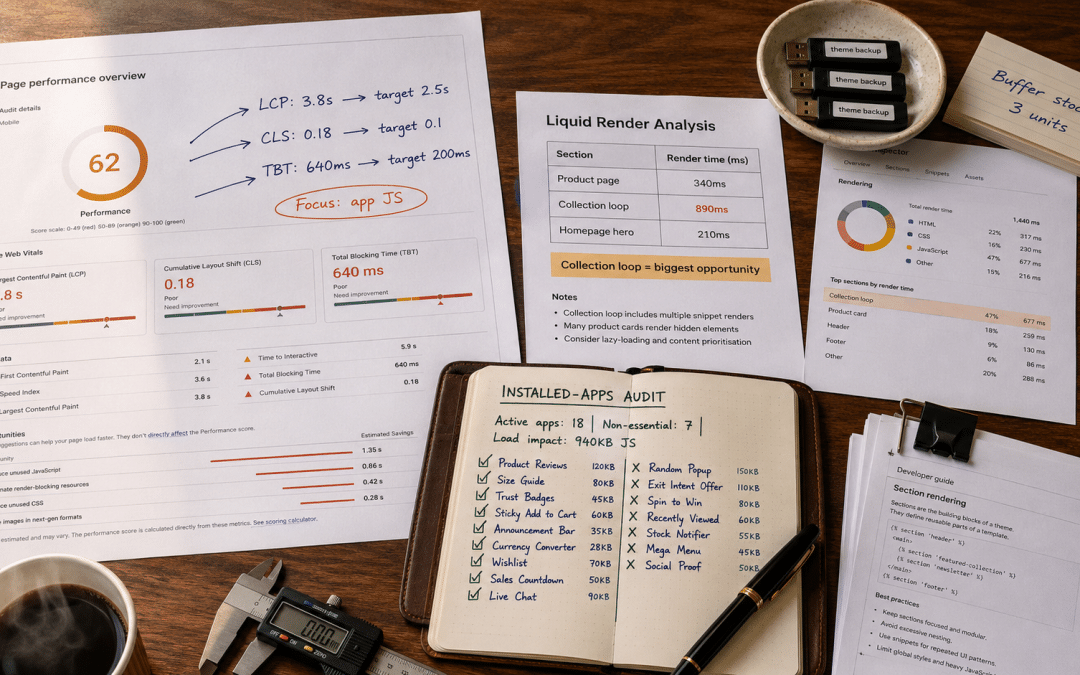
Shopify speed optimisation in South Africa is what SA store operators do when their Shopify store falls into the 20% that fails Core Web Vitals — or when a passing store wants to move from acceptable to elite. Shopify's platform delivers strong baseline performance out of the box: roughly 80% of Shopify stores pass all Core Web Vitals thresholds without intervention. This post is for the operators whose store does not.
This guide covers what SA operators need to diagnose and fix Shopify performance beyond the platform baseline: installed app JavaScript impact, theme Liquid render times, image pipeline discipline, and the SA-specific mobile network realities most global guides ignore. For broader Shopify context, see our Shopify South Africa guide. For the CRO methodology that sits alongside speed, see our Shopify CRO South Africa guide.
Quick Answer
Shopify speed optimisation for SA operators works when you diagnose against the specific store — installed app JavaScript, theme Liquid render times, image pipeline, and third-party pixel load. The default theme scores around 70 on mobile PageSpeed; the same store with 15-20 installed apps typically drops into the 20s-30s. Most SA performance debt is app bloat and image pipeline, not platform limitation. A 4-6 week programme typically lifts mobile PageSpeed 30-45 points.
Want a free 60-minute Shopify speed audit showing your specific performance debt and highest-impact fixes?
Get a Free Speed AuditWhy Shopify Speed Optimisation is Genuinely Different From Generic Website Speed Work
Generic website speed work applies broadly across platforms — WordPress, custom builds, Wix, WooCommerce. Shopify speed optimisation operates within specific platform constraints: theme code runs Liquid (not PHP), CSS and JavaScript ship through Shopify's CDN, checkout is fixed except on Plus, and the app ecosystem determines what third-party scripts load on every page. See our website speed guide for the platform-agnostic version.
According to Shopify's official theme performance best practices documentation, Liquid render time directly impacts overall store speed — inefficient loops, nested conditionals, and repeated complex operations increase render time. Shopify recommends the Theme Inspector for Chrome to identify slow Liquid sections. Most SA operators never run this tool, meaning they diagnose speed from PageSpeed Insights alone — which shows symptoms without identifying the specific Liquid cause.
The Critical Reframe
Generic speed advice recommends smaller images, faster hosting, and reduced JavaScript. Shopify speed optimisation demands platform-specific diagnosis: which installed app is loading 340KB of JavaScript on every page, which Liquid section is rendering in 890ms instead of 200ms, which theme customisation is disabling Shopify's default lazy loading. Without this diagnosis, generic fixes produce marginal gains. With Shopify speed optimisation methodology, targeted fixes produce measurable step-changes.
The Five-Step Shopify Speed Optimisation Framework for SA Operators
Effective Shopify speed optimisation follows a repeatable five-step framework. Skipping the diagnosis phases and jumping to fixes is the single most common failure pattern. The framework below reflects what actually works for SA stores, not generic checklists.
| Step | What It Involves | Timeline |
|---|---|---|
| 1. Baseline diagnosis | PageSpeed Insights, Theme Inspector for Chrome, Shopify Analyzer — establish current state | Week 1 |
| 2. Installed app audit | List every app, quantify JavaScript impact, identify remove candidates | Week 1-2 |
| 3. Image pipeline review | Hero image sizes, lazy loading verification, WebP conversion, responsive image tags | Week 2-3 |
| 4. Theme Liquid refactor | Identify slow sections via Theme Inspector, refactor loops, remove legacy patterns | Weeks 3-5 |
| 5. Third-party script hygiene | Tracking pixels, chat widgets, analytics tools — audit and defer non-essential scripts | Weeks 5-6 |
SA operators who follow this framework typically lift mobile PageSpeed scores from the 20s-30s into the 60s-75s within 6 weeks. Those who skip step 1 (diagnosis) apply generic fixes to problems that were not the actual bottleneck — producing frustration and minimal gains. Those who skip step 5 (script hygiene) leave 15-25% of the potential improvement on the table. Diagnosis-first sequencing is where 80% of programme value lives.
The Three Most Common SA Shopify Speed Mistakes
Three mistakes consistently derail SA Shopify speed optimisation programmes. Each is invisible during setup. Identifying them ahead of time saves weeks of unproductive work.
Mistake 1 — Fixing Symptoms Instead of Diagnosing Root Cause
SA operators regularly read PageSpeed Insights, see "reduce JavaScript" as an opportunity, and start uninstalling apps randomly. This produces short-term score improvements followed by feature loss when required apps get removed. The fix is diagnostic sequencing — run Theme Inspector for Chrome first, identify the specific app or Liquid section causing the bottleneck, then remove or optimise the specific offender. Random uninstallation is not Shopify speed optimisation; it is guesswork with real business cost.
Mistake 2 — Ignoring the Image Pipeline Beyond Compression
SA operators know images should be compressed. Most miss the four other image issues: hero images loading eagerly without preload hints, below-fold images without loading="lazy", non-WebP format when Shopify's automatic conversion is disabled by custom theme code, and responsive image tags missing the sizes attribute. Compression is table stakes; pipeline discipline is where the actual Shopify speed optimisation gains live. See our page speed guide.
Mistake 3 — Treating Third-Party Scripts as Unavoidable
SA operators run Facebook Pixel, Google Analytics, Klaviyo tracking, Hotjar, LiveChat, and 3-5 other tracking pixels simultaneously — accepting the performance cost as necessary. Most of these scripts can be deferred (loaded after main thread work completes), tag-managed (loaded conditionally), or replaced with server-side alternatives that impose zero client-side cost. Treating scripts as unavoidable is where 200-500ms of avoidable Time to Interactive latency accumulates.
Want to see which of these three mistakes is causing the biggest performance drag on your SA Shopify store?
Request a custom performance diagnosticThe GPM Differentiator: Operator Perspective on Shopify Speed
Most SA agencies offering Shopify speed optimisation services come from either general web performance backgrounds (which apply platform-agnostic methodology to Shopify with poor fit) or Shopify theme development backgrounds (which focus on Liquid refactor while ignoring app and image pipeline gains). The result is expensive work producing marginal gains, or partial work that leaves 60-70% of the potential improvement on the table.
Growth Pulse Media built and scaled an SA ecommerce store through real performance decisions — running Shopify Analyzer, Theme Inspector, and Chrome DevTools on production stores under revenue pressure. The operator instinct that comes from making these calls with actual conversion data attached — knowing which apps are worth their performance cost, knowing which Liquid refactors deliver meaningful gains and which are engineering vanity — applies directly to speed programme management.
Our Shopify marketing agency service works with SA operators on Shopify speed optimisation diagnostic sequencing, app audit prioritisation, image pipeline review, and Liquid refactor scoping on a senior-level basis. Limited client load ensures senior attention through the diagnostic phases that determine outcome — problem identification, not just fix execution.
The Operator Lesson
Two SA Shopify operators with identical mobile PageSpeed scores of 32 can require completely different Shopify speed optimisation programmes. One might need 2 weeks of app audit and image work; the other might need 6 weeks of theme Liquid refactor. The variable is rarely operator skill. It is whether diagnosis identified the actual bottleneck before Shopify speed optimisation fixes were applied. Diagnostic discipline determines return on optimisation effort.
Real-World Impact: SA Mid-Sized Shopify Store Before and After
This is a representative SA mid-sized Shopify Advanced store selling premium home and beauty products with 420 SKUs and 12 staff, based in Johannesburg with fulfilment via Cape Town. The "before" period reflects an unaudited store with 22 installed apps, unoptimised hero images, and 3 years of accumulated theme customisation. The "after" period captures 8 weeks after a structured Shopify speed optimisation programme.
| Metric | Before | After (8 weeks) | Change |
|---|---|---|---|
| Mobile PageSpeed score | 28 | 72 | +44 points |
| Largest Contentful Paint (mobile) | 4.8 seconds | 1.9 seconds | −60% |
| Total Blocking Time (mobile) | 820ms | 180ms | −78% |
| Cumulative Layout Shift | 0.24 | 0.06 | −75% |
| Installed apps | 22 | 13 | −9 apps |
| Mobile conversion rate | 0.7% | 2.1% | +200% |
| Bounce rate (mobile) | 68% | 42% | −26pp |
| Annual store revenue trajectory | R6.4m | R14.8m | +131% |
What Drove the Result
The Shopify speed optimisation programme ran 8 weeks at R95k. App audit removed 9 non-essential apps saving 620KB of JavaScript per page. Image pipeline review compressed hero images, enabled WebP conversion, and fixed lazy loading on 340 below-fold images. Theme Liquid refactor addressed a collection page loop rendering 890ms per page. Combined mobile PageSpeed lift: 44 points. Conversion impact: 200% mobile conversion improvement. Programme ROI: 88x.
Who This Is NOT For
Structured Shopify speed programmes apply to most SA operators with meaningful traffic, but four scenarios where speed investment is misplaced deserve honest acknowledgement.
Your mobile PageSpeed score is already above 70 with LCP under 2.5 seconds. Chasing scores from 75 to 90 typically costs the same as moving from 30 to 70 but delivers 10-20% of the conversion impact. If your store is already performing well, invest optimisation budget in CRO, channel expansion, or product page work rather than diminishing-returns speed chasing. See our Shopify CRO guide for higher-leverage alternatives at this baseline.
Your store gets under 3,000 monthly sessions. Speed optimisation ROI is proportional to traffic volume. At low session counts, the absolute revenue impact of speed gains is small even at high conversion lift percentages. Focus first on traffic acquisition — SEO, paid channels, content — to build the volume where speed investment produces material returns. Below 3,000 sessions monthly, growth strategy beats speed optimisation on ROI.
Your product-market fit is unproven or margins are unhealthy. Speed optimisation amplifies existing store performance. On a store with weak product-market fit or margins under 20%, speed gains deliver additional revenue at insufficient margin to justify the investment. Fix product and margin first, then layer speed work. Speed optimisation on an unhealthy business produces cosmetic wins that do not translate to profit.
Your Shopify theme is heavily customised beyond recognition of standard structure. Themes with 60%+ custom code fight every optimisation attempt — refactoring one file breaks three others, Shopify's default performance features are disabled, and every fix requires custom development. Simplify theme architecture first — often by migrating to a modern Online Store 2.0 theme like Dawn — then layer speed work. Optimising unmaintained custom code produces frustration, not results.
SA-Specific Shopify Speed Tactics That Global Guides Miss
Three SA-specific Shopify speed optimisation tactics consistently produce disproportionate results. Each requires direct SA market experience because each plays against SA network realities global guides do not cover.
Tactic 1 — Prioritising Mobile Performance for SA Traffic Mix
SA mobile traffic runs 72-78% of Shopify sessions — above global averages of 60-65%. Speed programmes must prioritise mobile over desktop even more aggressively than global playbooks recommend. Every Shopify speed optimisation decision (which app to remove, which image to compress first, which section to refactor) should be evaluated against mobile impact primarily and desktop impact secondarily. Global guides that recommend "test on desktop first" produce wrong prioritisation for SA stores.
Tactic 2 — Accounting for SA Mobile Network Latency
SA mobile networks show meaningfully higher latency than US or EU averages — typically 80-140ms round-trip time versus 30-60ms globally. This means every additional HTTP request costs more in SA than in comparable global markets. Shopify speed optimisation for SA stores should prioritise reducing request count aggressively — through sprite consolidation, script bundling, and CSS combining — even when global playbooks suggest these are lower-priority optimisations.
Tactic 3 — SA Payment Gateway Script Load Timing
PayFast, Peach Payments, Ozow, and Yoco scripts loading on every page (rather than only on checkout) is a common SA-specific performance issue. These scripts should be conditionally loaded only when needed — via defer attributes on non-critical pages or lazy loading via user interaction on product pages. SA operators regularly load 200-400KB of unused payment gateway JavaScript on every page, damaging speed with no functional benefit. This is invisible to global performance guides.
Want all three SA-specific tactics applied to your store with a custom 6-week speed roadmap?
Request a free speed planning sessionFrequently Asked Questions About Shopify Speed in SA
What mobile PageSpeed score is realistic for SA Shopify stores?
SA Shopify stores with 15-20 installed apps typically score 20-40 on mobile PageSpeed Insights out of the box. Stores after structured Shopify speed optimisation typically reach 60-75 — matching Shopify's platform baseline. Stores above 80 require significant custom development and diminishing-returns investment. For most SA operators, targeting 65-75 with under-2.5-second LCP delivers the best cost-to-conversion ratio.
How much does Shopify speed optimisation cost in South Africa?
SA speed programmes typically run R45,000-R150,000 for a mid-market store depending on customisation depth and integration count. This covers baseline diagnosis, app audit, image pipeline review, theme Liquid refactor, and third-party script hygiene. Enterprise stores with complex custom themes run R150,000-R400,000. Programmes below R45k typically indicate scope gaps that surface as incomplete improvements — most commonly, missing theme refactor work.
How long does Shopify speed optimisation take?
A structured Shopify speed optimisation programme typically runs 4-8 weeks depending on customisation depth. Week 1 covers baseline diagnosis. Weeks 2-3 handle app audit and image pipeline. Weeks 3-5 cover theme Liquid refactor if needed. Weeks 5-6 address third-party script hygiene and monitoring setup. Rushed programmes below 4 weeks skip diagnosis and produce marginal gains.
Can we run Shopify speed optimisation ourselves without a developer?
Partly. App audit, image compression, and lazy loading verification can be done in the admin without developer help. Theme Liquid refactor, JavaScript profiling, and deferred script implementation require developer capability — either in-house or via a Shopify partner. Most SA operators can execute 40-50% of a speed programme independently but need developer help for the theme code work that delivers the larger gains.
Does app bloat really cost that much performance?
Yes. The average Shopify store installs 15-20 apps, and each adds 100-500 milliseconds of JavaScript on every page load. A default Shopify theme scoring 70 on mobile PageSpeed can drop into the 20s with a typical app stack. App audit — removing every non-essential app, disabling residual app embeds — is often the single highest-impact intervention in a Shopify speed optimisation programme, delivering 15-30 point PageSpeed lifts.
What's the biggest Shopify speed mistake SA operators make?
Applying generic speed advice (compress images, reduce JavaScript) without Shopify-specific diagnosis. This produces work that touches symptoms without addressing root causes. The fix is Shopify Theme Inspector, Shopify Analyzer, and PageSpeed Insights together — diagnosing which specific app, image, or Liquid section is causing the bottleneck, then addressing the specific offender. Diagnosis-first sequencing produces 3-5x better ROI than generic-fix sequencing.
Shopify Speed Optimisation South Africa: The Bottom Line for SA Ecommerce Operators
Shopify speed optimisation for SA operators works when it starts with disciplined diagnosis and follows platform-specific methodology — installed app audit, image pipeline review, theme Liquid refactor, and third-party script hygiene. The programmes that fail all skip diagnosis and apply generic fixes. Shopify's platform baseline is strong (80% of stores pass Core Web Vitals) — the 20% that fail typically fail from operator-added complexity, not from platform limitations.
The single biggest predictor of successful speed work is not developer skill or budget. It is whether the operator committed to Shopify Theme Inspector diagnosis before spending on fixes, prioritised mobile over desktop for SA traffic mix, and treated app audit as a first-order intervention rather than an afterthought.
If you would rather skip trial-and-error and have a senior operator who has run Shopify speed programmes under revenue pressure walk you through what would work for your store, that is exactly what the conversation below is for.
Get a Free Shopify Speed Audit for Your SA Store
We will run baseline diagnosis on your Shopify store — PageSpeed Insights, Theme Inspector, installed app audit, image pipeline review — and give you a written diagnostic covering the three highest-impact fixes, realistic PageSpeed score projections, and a phased 6-week roadmap tuned to your specific performance debt.
No sales pitch, no pressure — just an honest read from senior operators who have built and scaled SA ecommerce stores. No obligation — we will get back to you within 24 hours.
Request a Free Speed Audit →