
 Add to Preferred Sources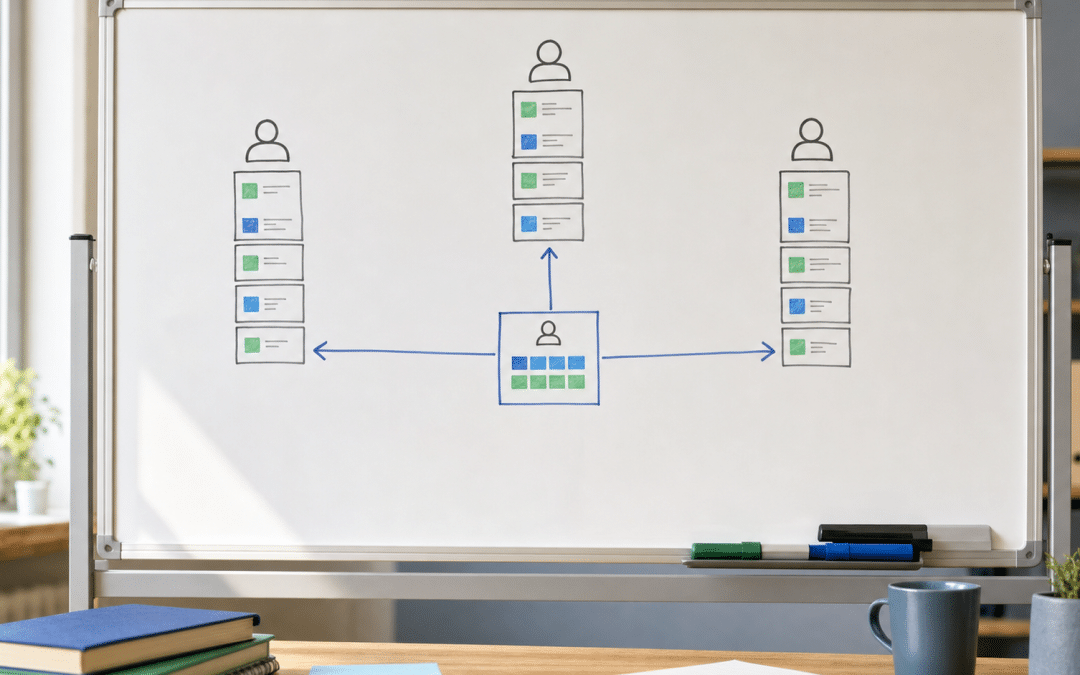
Calendly round robin is a team scheduling feature that automatically rotates one-on-one meetings across a group of hosts — so when a prospect, client, or job candidate books a slot, Calendly assigns them to the next available team member without anyone having to intervene manually.
If your business uses a website to capture enquiries, adding a scheduling link to your contact or services page turns inbound interest into confirmed appointments without the back-and-forth.
The feature sits on Calendly's Teams plan, and it ships with two fundamentally different distribution methods that most SA operators never configure properly — defaulting to whichever the platform picked on setup. Getting this right is a five-minute change that determines whether your busiest sales rep keeps absorbing every new enquiry or whether the workload spreads fairly. Calendly's official distribution overview describes both modes; this guide maps them to specific SA team scenarios and walks through the setup for each path.
Quick Answer
Calendly round robin is a Teams-plan feature that automatically assigns inbound bookings to one team member at a time, rotating across the group.
It offers two distribution modes: Maximize for Availability (maximises total bookable slots, good for high-volume teams) and Optimize for Equal Distribution (caps any individual at three meetings ahead of colleagues, better for fairness-sensitive teams). Set it up either via a Calendly team page (requires an admin) or as a Shared Round Robin from your own Scheduling page — no admin needed.
Jump to a section
Does your website turn visitors into booked meetings?
Send us your current contact or enquiry flow and we will show you exactly where prospects are dropping off before they book.
Get a Free Flow ReviewWhat Is Calendly Round Robin?
Calendly round robin is an event type that presents a single booking link to an invitee but distributes confirmed meetings across multiple hosts behind the scenes, based on rules you set. The invitee sees available time slots without knowing — or needing to know — which team member they will be assigned to.
It differs from the other Calendly team event types in a specific way:
| Event Type | Hosts | Invitees | Rotation | Plan Required |
|---|---|---|---|---|
| One-on-one | 1 | 1 | None | Free and above |
| Group | 1 | Multiple | None | Standard and above |
| Collective | Multiple (all required) | 1 | None | Standard and above |
| Round Robin | Multiple (one assigned) | 1 | Yes | Teams and above |
The key distinction between round robin and collective scheduling is that collective requires every named host to be free at the same time — useful for panel interviews or multi-stakeholder calls. Round robin only needs one host free per slot, which is why it can surface far more available times for a busy inbound queue.
Key fact
Round robin requires Calendly's Teams plan (or Teams Plus / Enterprise). The Standard plan — the tier most SA small businesses start on — does not include it. If you see the round robin option greyed out, a plan upgrade is the fix.
Which SA Businesses Need Team Meeting Distribution?
Team meeting distribution solves a specific problem: one shared booking link, multiple people who could handle the meeting, no admin to manually assign. If your team hands off that assignment by WhatsApp message or a quick office chat, you are already paying a coordination cost that round robin eliminates.
Common SA use cases where it earns its keep:
- Sales teams with shared territories. A Gauteng-based team of three account executives all covering SME inbound — one link on the website, leads distributed automatically.
- Professional services with multiple consultants. Financial planners, attorneys, or HR consultants running intake calls — clients book a time, the system assigns the next available advisor.
- Recruitment agencies. Candidate phone screens distributed across the talent team without a coordinator manually diarising each one.
- Property brokers. A handful of agents sharing a "Book a viewing enquiry" link on the website; equal distribution prevents the senior agent absorbing all first-call opportunities.
- Customer onboarding. A SaaS or services business where new clients need a 30-minute onboarding call with any qualified team member within 48 hours of sign-up.
If your team also uses Google Calendar for individual appointment scheduling, Calendly integrates directly with Google Calendar — each host connects their own calendar so their busy blocks are reflected in real time.
A frequently cited industry benchmark puts average B2B lead response time at 42 to 47 hours. A round robin booking link on your website replaces that delay with an immediate self-service booking — the prospect is confirmed in a diary within minutes, not hours.
Two Distribution Methods — Which One Fits Your Team?
Calendly's round robin distribution offers two modes, and they are not interchangeable — the right choice depends on your team's size, enquiry volume, and what you optimise for.
| Scenario | Best Method | Why |
|---|---|---|
| High inbound volume, team has predictable availability blocks | Maximize for Availability | Shows maximum bookable slots; fills calendars fast |
| Small team (2–5), fairness matters as much as speed | Optimize for Equal Distribution | 3-meeting cap prevents one rep taking all early slots |
| Senior rep who should absorb overflow only | Maximize for Availability + priority stars | Assign higher priority to preferred hosts; senior rep catches overflow |
| New team member being onboarded gradually | Optimize for Equal Distribution | Natural ramp-up; new member gets proportional share |
| Commission-sensitive sales team | Optimize for Equal Distribution | Prevents perceived favouritism in lead assignment |
Maximize for Availability — how it works
This method displays all available time slots where at least one host is free, then uses a priority ranking system (priority stars) to decide the assignment when multiple hosts are available. The host with the highest priority star rating is assigned first; if priorities tie, the system looks at recent scheduling history and favours the host who has had fewer recent meetings. Random selection resolves any remaining tie.
The result: more bookable slots surface to your invitee, which increases the chance they find a time that works. The trade-off is that a higher-priority host may accumulate more meetings if the priority settings are not carefully reviewed.
Optimize for Equal Distribution — how it works
This method tracks each host's cumulative round robin meeting count and enforces a hard cap: no host can be more than three meetings ahead of the least-loaded team member. Once a host hits that threshold, their availability is hidden from the booking page until their colleagues catch up.
The booking experience for the invitee is largely unchanged — they still see available slots, just from the pool of currently eligible hosts. For a commission-based SA sales team or any environment where perceived fairness affects morale, this setting avoids one rep dominating the lead flow simply because they logged in first or had an open diary on Monday morning.
How to Set Up Round Robin in Calendly
There are two paths depending on whether your Calendly account has a team page. The shared event path is faster for small SA businesses without a dedicated Calendly admin.
Path A: Shared Round Robin (no team page required)
Use this if you want a quick setup without admin involvement. All hosts must have already accepted their invitation to join your Calendly organisation.
- Go to your Scheduling page and click + Create.
- Select Round robin from the event type options.
- Enter an event name and set the duration.
- In the Hosts section, select the default round robin pool to open its settings.
- Click + Add to include teammates from your organisation.
- Choose your distribution method (Maximize for Availability or Optimize for Equal Distribution).
- Configure rescheduling preferences, location settings, and availability hours.
- Click Create.
Path B: Team Round Robin (team page required)
Use this if your account already has a Calendly team page set up, or if you want the event to live on a team landing page rather than an individual's scheduling page.
- Navigate to your team page in Calendly.
- Click the three-dot menu in the top-right corner of the team page.
- Select + New Team event type → Round robin.
- Enter an event name and duration.
- In the Hosts section, all team members are added automatically.
- Select the host pool to access distribution settings; remove or add hosts as needed.
- Set your distribution method, rescheduling preferences, and location.
- Configure availability (date range and whether to use host-specific hours or unified team hours).
- Click Create.
Four Settings to Configure Correctly
The four settings that determine how a team meeting rotation actually behaves are: distribution method, priority stars (Maximize mode only), rescheduling host preference, and availability hours — each requires an explicit decision before you go live. Most teams configure the event name and duration and publish without reviewing any of them.
| Setting | What to Decide | Common Mistake |
|---|---|---|
| Distribution method | Availability vs Equal Distribution (see table above) | Leaving default without reviewing team size and use case |
| Priority stars (Maximize only) | Who should handle overflow vs. first-in-queue | All hosts at same priority — undermines the star system |
| Rescheduling host preference | Reassign on reschedule, or retain original host | Default reassigns — not always what sales teams want for relationship continuity |
| Availability hours | Host-specific schedules or unified team hours | Unified hours that don't match individual calendars, causing double-bookings |
One SA-specific note: if your team works across time zones (Johannesburg + a Cape Town remote staff member, for example), set each host's availability to their own schedule rather than a unified block. Unified hours default to the administrator's time zone and can expose slots where the remote host is unavailable.
Before you go live
Confirm three things before publishing your team scheduling event: the distribution method matches your team's priority (fairness vs. volume); priority stars are configured intentionally if using the Maximize method; and each host has connected their own calendar so their busy blocks are visible in real time. These take two minutes to check and prevent the most common configuration problems.
Is your website set up to capture bookings properly?
Tell us about your current setup and we'll assess whether your contact flow, hosting, and scheduling integration are fit for the enquiry volume you're targeting.
Book a Free AssessmentWhy South African Businesses Choose Growth Pulse Media
Growth Pulse Media treats scheduling integration as part of the conversion architecture — the booking link sits at the exact point in the visitor journey where intent is highest, on a page fast enough not to lose the click, rather than bolted to an existing page as an afterthought. That placement decision, and the page design that earns the click before the form loads, is where the real work is.
At Growth Pulse Media, our web design service treats scheduling integration as part of the conversion architecture, not an afterthought. We work with a limited number of clients at a time so that senior attention is on every project — no junior handoffs, no templated builds that ignore how your specific enquiry flow works.
When you're comparing Calendly against Microsoft Bookings or evaluating whether a booking tool fits your existing Microsoft or Google stack, the choice often depends on where the tool sits in your wider website and CRM workflow. That broader assessment — not just the scheduling tool — is where the real leverage is.
If you're also considering whether Calendly or Google Calendar appointment scheduling better fits your team, the short version is that round robin assignment is a Calendly-specific feature — Google Calendar's appointment scheduling is single-host only.
Who This Is NOT For
Frequently Asked Questions
What plan does Calendly round robin require?
Round robin scheduling is available on the Teams plan and above (Teams, Teams Plus, and Enterprise). The Free and Standard plans do not include this event type. The Teams plan is priced at $16 per seat per month billed annually; the monthly billing rate is commonly cited as approximately $20 per seat — verify the current rate at calendly.com/pricing before committing.
What is the difference between Maximize for Availability and Equal Distribution in Calendly?
Maximize for Availability shows the maximum number of bookable time slots by including any slot where at least one host is free, using priority stars to decide which host gets the meeting. Optimize for Equal Distribution tracks each host's cumulative meeting count and hides availability for anyone who is more than three meetings ahead of the least-loaded team member, ensuring a fairer workload spread.
Can I set up Calendly round robin without a team page?
Yes. Calendly's Shared Round Robin option lets you create a rotating event directly from your Scheduling page without needing a team page or admin assistance. All hosts must have accepted their invitation to join your Calendly organisation first. The Team Round Robin path, which does require a team page, places the event on a shared team landing page instead.
What happens when a round robin booking is rescheduled?
By default, Calendly reassigns rescheduled round robin meetings based on the distribution rules at the time of rescheduling — not back to the original host. If your team needs relationship continuity (for example, a sales rep maintaining the same contact throughout a deal), change this setting during event setup to retain the original host on reschedules.
Does Calendly round robin work with Google Calendar?
Yes. Each host on a team scheduling event connects their own Google Calendar (or Outlook, or iCloud). Calendly reads their busy blocks in real time, so a host who is already booked will not appear as available in the rotation. This is the integration that makes the distribution accurate rather than theoretical.
Ready to Turn Website Visitors Into Booked Meetings?
Growth Pulse Media builds conversion-focused websites for South African businesses — with scheduling tools, enquiry flows, and integrations set up to work from day one. No obligation — we will get back to you within 24 hours.
Get a Free Website Consultation