
 Add to Preferred Sources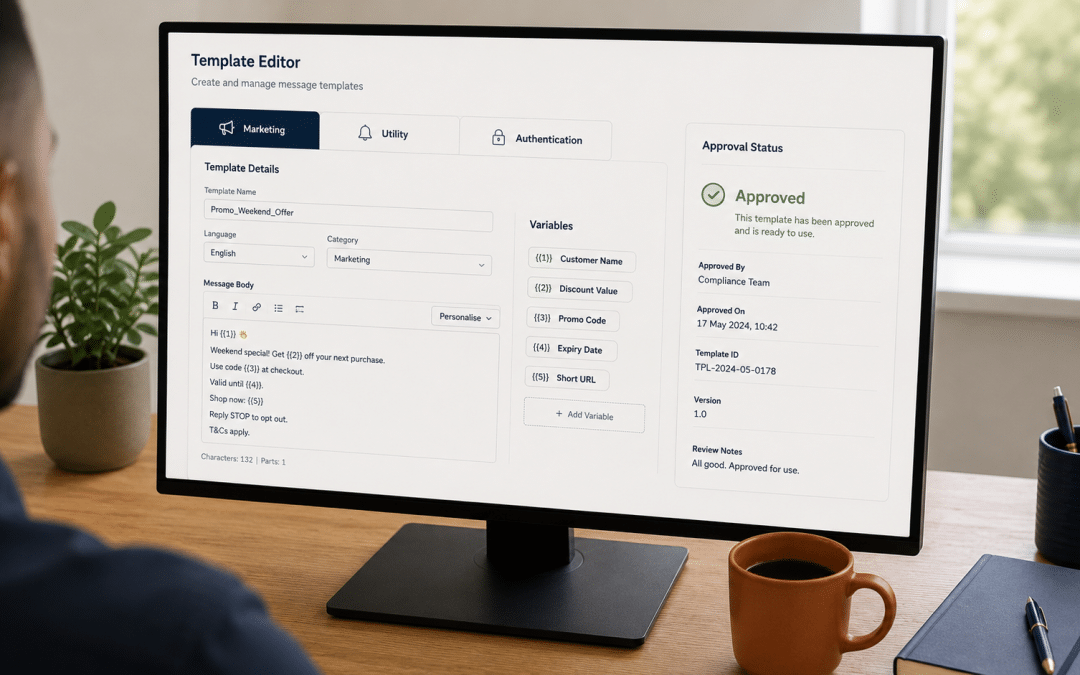
Whatsapp marketing templates for SA businesses must clear Meta's category approval process before they can be sent — and since the April 2025 categorisation update, Meta now auto-reclassifies any submission that does not match its declared category. Getting the structure right at submission means the message ships in minutes; getting it wrong means rejection, re-categorisation to a higher pricing tier, or in repeat-abuse cases, account-level template restrictions.
This guide gives 18 SA-ready examples across the three Meta categories (Marketing, Utility, Authentication), each with the exact structure, variables, approval rationale, and the SA use case that fits.
For the broader context this sits inside, start with our WhatsApp Marketing SA pillar guide.
Quick Answer
Whatsapp marketing templates fall into three Meta-defined categories. The promotional category supports up to 1,024 characters and may include promotional content, offers, retargeting, and brand updates — they require the recipient to have opted in.
Utility-category sends must be strictly transactional (order confirmations, shipping updates, reminders) and cannot contain promotional content. Authentication-category sends must use Meta's preset OTP format, cannot include URLs, media, or emojis, and require a daily messaging limit of 2,000 conversations to access.
Since April 9, 2025, Meta automatically reclassifies submissions that do not match their declared category. Anything submitted as Utility but containing promotional content gets auto-moved to the higher pricing tier without operator consent. For SA businesses, this means category discipline at submission directly controls per-message pricing and approval speed.
Want a quick read on whether your current SA template library is correctly categorised against the April 2025 Meta update?
Get a Free Template Category CheckThe Three Meta Categories — and Why It Matters
Every approved message on WhatsApp Business Platform sits in one of three categories. The category determines pricing per send, approval speed, content allowed, and which buttons can be attached. SA businesses that pick the right category for their whatsapp marketing templates at submission get faster approval and lower per-message costs; ones that mix categories or submit promotional content as Utility get reclassified, fined the higher rate, and risk account-level template restrictions.
| Category | Use Case | Character Limit | Content Restrictions |
|---|---|---|---|
| Marketing | Promotions, offers, retargeting, brand updates | 1,024 characters | Quick-reply opt-out button recommended |
| Utility | Order confirmations, shipping updates, reminders | 1,024 characters | Must be strictly transactional — no promotional content |
| Authentication | OTP codes, login verification | Meta preset format | No URLs, no media, no emojis, requires OTP button |
The single most common SA submission mistake is putting promotional content inside a Utility-category send — for example a "Your order is on its way! Use code WELCOME15 on your next order" message. Meta classifies that as hybrid intent and reclassifies it to the promotional tier. The April 2025 update made this automatic, so what used to be a soft warning is now a category change applied without operator consent.
The Per-Message Pricing Difference Whatsapp Marketing Templates Drive
Since Meta's July 2025 per-message pricing model, each category carries different ZAR rates. Promotional sends cost meaningfully more per send than Utility sends — the gap is in the 30-60% range depending on SA market specifics. Authentication messages, when accessible (2,000 conversation/day minimum), often have the lowest international rate after the April 2025 SA-specific authentication reduction.
For SA operators sending high volume across whatsapp marketing templates, category accuracy directly controls monthly cost. A 10,000-message-per-month sender mis-categorising 30% of their sends as promotional when they should be Utility could be overspending by R 2,000-R 4,000/month at SA per-message rates.
Marketing Category — 6 SA-Approved Whatsapp Marketing Templates
Promotional-category sends are the workhorse for SA promotions, sale announcements, retargeting, and customer engagement. The 1,024-character limit (the older 550-character cap was rolled back) gives meaningful room for context, social proof, and a clear next action. Each example below uses Meta's variable syntax — {{1}}, {{2}} — replaced at send time with personalised data.
1. Welcome series — first message
SA use case: Ecommerce stores capturing new opt-ins via website widget or post-purchase prompt. Welcome-series first sends typically run 50-65% open rate in the first hour, click-through to website at 12-18%, and first-purchase conversion at 6-10% for the new subscriber cohort.
Approval note: Quick Reply STOP language at the bottom is recommended by Meta. The voucher code with the R-amount variable typically approves first time — opt-out language signals best-practice intent to Meta reviewers.
2. Abandoned-cart recovery — 24-hour window
SA use case: Ecommerce abandoned-cart recovery sent 24-48 hours after cart abandonment. Conversion-to-purchase on this send typically runs 15-25% for SA ecommerce — higher than email-based cart recovery for the same window.
Approval note: The "still in your cart" framing keeps the message customer-utility-coded (the customer initiated the cart). The promotional element is absent, which speeds approval. Adding "10% off if you complete now" would push it into stricter promotional review.
3. Sale announcement — limited-time campaign
SA use case: Annual sale or seasonal promotion to existing customer list. Open rates for sale announcements average 60-75% for engaged WhatsApp lists, click-through 18-25%, conversion 8-14%. The opt-out line is mandatory under POPIA Section 11(3) on every promotional message.
Approval note: Date-bounded promotional language ("until {{3}}") approves as promotional without ambiguity. Open-ended "sale this week" language sometimes triggers review delays.
4. Loyalty reward — milestone unlock
SA use case: Loyalty programme milestone notifications. Conversion on milestone-trigger sends typically runs 25-40% — far higher than generic promotional sends because the trigger is customer-action-based and feels personally relevant.
Approval note: Loyalty-trigger sends approve cleanly because the message is contextually tied to customer behaviour. Meta reviewers favour relevance signals over generic broadcasts.
Building your first whatsapp marketing templates library and unsure which 6 to prioritise for your SA business stage?
Get a Free Template Priority Map5. Restock notification — back-in-stock trigger
SA use case: Ecommerce restock alerts for customers who used a "Notify me" form. These hit 40-80% conversion-to-purchase rates for SA stores — the trigger is the strongest signal in commerce because the customer explicitly raised intent.
Approval note: Customer-request-based sends approve in minutes. The "you asked us to let you know" framing makes the customer-initiated nature explicit to Meta reviewers and keeps it clear of reclassification risk.
6. Upsell — post-purchase complement
SA use case: Post-purchase upsell at 7-14 days after the original order. Conversion-to-second-purchase typically 8-12%, higher when the recommended product genuinely complements the original. Lower-quality recommendations push opt-out rates up.
Approval note: The discount + time-bound code combination is squarely promotional and approves without issue. Strong recommendation: avoid stacking more than one discount mechanic per send, as multiple-offer messages sometimes face slower approval.
Utility Category — 6 SA-Approved Whatsapp Marketing Templates
Utility messages are the transactional backbone — order confirmations, shipping updates, appointment reminders, payment alerts. They cost meaningfully less than promotional sends per send and customers typically respond positively because the content is genuinely useful. The critical rule: zero promotional content. Meta auto-reclassifies any Utility-category send that contains a discount code, upsell mention, or social-content prompt.
7. Order confirmation
SA use case: Immediate post-purchase confirmation on every ecommerce order. SA ecommerce stores switching from email-only to WhatsApp+email confirmation report 30-40% reduction in "where is my order" support tickets.
Approval note: Pure transactional content with no promotional intent — approves in under 5 minutes typically. The tracking link is Meta-compliant for Utility-category sends because it serves a customer-utility purpose, not a promotional one.
8. Shipping update — out for delivery
SA use case: Day-of-delivery notification with The Courier Guy, Aramex, RAM Couriers, or PostNet. Reduces failed-delivery rates by 25-40% for SA ecommerce stores — the customer is ready to receive instead of being out when the courier arrives.
Approval note: Logistics-operational send — approves cleanly. Be careful with "HELP" as a keyword reply — Meta sometimes intercepts certain keywords; specify what HELP triggers in your routing logic.
9. Appointment reminder — 24-hour advance
SA use case: Service business reminders — medical practices, beauty salons, professional services, automotive workshops. Cuts no-show rates by 40-60% versus no-reminder baseline. Pure utility intent, fast approval.
Approval note: Appointment-confirmation sends approve in minutes. The two-option reply (YES / CHANGE) signals customer-utility focus and keeps the send Utility-categorised even if you add interactive flows later.
10. Payment received confirmation
SA use case: Payment receipt notifications — especially relevant for SA B2B services, professional firms, and subscription businesses. The pattern works well with PayFast, Peach Payments, Yoco, and Stitch integrations sending notifications.
Approval note: Pure transactional confirmation with reference number — approves first time. The "Reply if anything looks off" line is service-focused and keeps it Utility.
11. Service status update — issue resolution
SA use case: Support ticket status notifications, insurance claim updates, service request progress. Removes ambiguity from the customer experience and reduces inbound "what's the status" enquiries by 50-70% for SA service businesses.
Approval note: Customer-service-initiated content with no promotional language — approves cleanly. The status framing keeps it firmly in Utility regardless of frequency.
12. Booking confirmation
SA use case: Hospitality, professional consultations, classes, events — anywhere SA businesses take advance bookings. The follow-up reminder reference (mentioning the next send) primes the customer for the appointment-reminder cycle without crossing into promotional territory.
Approval note: Multi-variable utility sends approve cleanly when each variable serves a clear customer-utility purpose. The calendar link approves because it serves the booking, not a promotional aim.
Authentication Category — 3 SA-Approved Whatsapp Marketing Templates
Authentication-category sends are the strictest. They must use Meta's preset format, cannot contain URLs, media, or emojis, and require the WABA to have a daily limit of 2,000 conversations to access. They also have the lowest per-message rate internationally for verified SA businesses after the April 2025 SA-specific reduction.
13. OTP code — login verification
SA use case: Login verification, password reset, account access via OTP. SA fintech, banking, and security-sensitive applications increasingly use WhatsApp OTP over SMS for higher deliverability and lower cost — both deliverability and unit cost favour WhatsApp at SA volume.
Approval note: Must use the exact Meta preset format. The "do not share" security warning and the expiration warning are both Meta-defined add-ons that approve automatically. URLs, emojis, or media in the body = automatic rejection.
14. Account verification — registration step
SA use case: Registration completion step where the customer is verifying their phone number ownership during onboarding. Critical for SA banking apps, telco signups, and high-security platforms where SMS deliverability has historically been unreliable.
Approval note: Effectively the same structure as the login OTP — the variable names differ but the Meta preset format applies identically. The Authentication category access threshold (2,000 conversation/day limit) must be met before submission.
15. Two-factor authentication — transactional step
SA use case: Step-up authentication for high-value transactions — banking transfers above a threshold, large ecommerce orders, sensitive account changes. The compressed format (no business name variable) is the simplest preset variant that approves fastest.
Approval note: Authentication messages have the fastest approval times of all three categories — typically under 60 seconds because Meta's preset format is checked against a tight schema rather than reviewed for content.
3 SA-Specific Templates That Mix Categories
Some real-world SA use cases sit at the boundary between categories. These three patterns are worth knowing because the boundary placement determines pricing, and getting it wrong triggers reclassification.
16. Order delivered + review request
Category placement: This sits at the boundary. The "delivered" notification is Utility; the review request is mild promotional. Meta's April 2025 auto-categorisation looks at the second half (the call-to-action) and typically classifies the whole submission as promotional. Operators who want this in Utility should split it into two separate sends 24-48 hours apart — Utility delivery notification, then a separate promotional review-request.
17. Subscription renewal reminder
Category placement: Utility when the framing is purely informational (above). If you add "Upgrade now and save 20%" — that becomes promotional automatically. The clean separation between informational renewal notice (Utility) and any upsell prompt (separate promotional send) keeps pricing efficient.
18. Refund processed notification
Category placement: Pure Utility. Refund notifications are textbook customer-action-initiated transactional content. Adding "We hope to see you back soon!" pushes it toward promotional — the closing line is the boundary control.
How Growth Pulse Media Approaches Template Strategy
Most agencies submit a few generic message formats, get them approved, and never revisit the library. We treat the whatsapp marketing templates library as a continuously-iterated asset — category review every 90 days (because Meta's auto-categorisation policy keeps tightening), per-message cost tracking against actual ZAR spend, approval-rate monitoring, and reclassification appeals filed within the 60-day window when warranted.
That usually means starting with a baseline of 12-18 well-categorised sends covering the customer journey end-to-end (welcome, transactional, retention, reactivation), then expanding to seasonal and campaign-specific formats as the library matures. Dirk has worked through Meta's approval system on a real SA ecommerce business that scaled before launching the agency, so the pattern reflects what actually approves vs what gets reclassified, not theoretical best-practice.
For SA businesses ready to take whatsapp marketing templates seriously, our WhatsApp marketing service covers the template strategy alongside the broader programme — with cross-channel integration into email marketing campaigns for omnichannel flows that respect each channel's compliance reality.
Who These Whatsapp Marketing Templates Are NOT For
The 18 whatsapp marketing templates above suit SA businesses operating on WhatsApp Business Platform (the API tier), not the free WhatsApp Business app. Here is who should look elsewhere first.
SA businesses on the free WhatsApp Business app: The free app has no approval system — it is for businesses sending under 256 messages/month to manually-saved contacts. The examples above only work on the API/Cloud API tier. If your sending volume is genuinely under 256/month, stay on the free app and skip this entire workflow. The overhead is not worth it at low volume.
Operators expecting whatsapp marketing templates to fix a broken opt-in process: Approved whatsapp marketing templates only deliver value if the recipient opted in lawfully under POPIA Section 69. SA businesses sending to scraped numbers, purchased lists, or "we found you on Google" contacts will see opt-out rates above 30% and risk WABA-level quality downgrades that throttle their messaging limits. Fix the opt-in upstream first.
Businesses without operational capacity for two-way replies: Every example above invites a reply (questions, opt-out, change requests). SA businesses without the team capacity to action inbound within 24 hours will see customer satisfaction drop sharply versus a properly-resourced setup. The platform is conversational — if you cannot converse, do not launch.
SA operators looking for a single mega-message covering all use cases: Meta explicitly rejects hybrid submissions — every message must serve one clear purpose. The "delivery confirmation that also asks for a review and offers a 10% discount on next order" pattern fails approval, gets reclassified to Marketing pricing, and undermines customer trust simultaneously. One purpose per send, every time.
Sitting between the "free app is fine" stage and the "we are ready to scale whatsapp marketing templates" stage of your SA WhatsApp programme?
Get a Free Programme Stage AssessmentOne discipline carries everything above: category honesty at submission saves real ZAR over the lifetime of the whatsapp marketing templates library. SA businesses that fight Meta's category classification — submitting Marketing content as Utility, hoping the reviewer misses it — pay the worst version of the cost. Meta's category guidelines reward operators who declare category accurately at submission and design each submission for one clear purpose.
The April 2025 auto-categorisation update for whatsapp marketing templates and Meta's tightening approach to repeat-abuse signals mean the casual "submit and see what approves" pattern for whatsapp marketing templates that worked in 2023 no longer works in 2026. SA businesses that internalise the category-discipline mindset before scaling their message library save themselves from the predictable cost spiral that catches the operators who optimise for short-term approval over long-term programme health.
Frequently Asked Questions
How long does whatsapp marketing templates approval take for SA businesses?
Authentication messages typically approve in under 60 seconds. Utility messages approve in 1-5 minutes when content is clearly transactional. Marketing-category messages take 5 minutes to 24 hours depending on content complexity and reviewer queue. Rejected submissions can be edited and resubmitted immediately — there is no penalty for resubmission, only for repeated abuse.
Can I edit a submission after it has been approved?
No. Approved whatsapp marketing templates are locked. To change wording, structure, or variables, you must create a new submission with a different name for fresh approval. This is why getting the structure right at first submission matters — there is no shortcut to modify a live one.
What happens if Meta reclassifies my Utility send as Marketing?
The send will continue, but at promotional pricing instead of Utility pricing — a meaningful per-send increase. You can request a review within 60 days of the reclassification. If the appeal succeeds, it reverts to Utility pricing. If it fails, it stays at promotional pricing or you must create a new one with stricter transactional framing.
Do I need a different template for English and isiZulu?
Yes. Each submission is tied to a specific language, and Meta does not translate variables or strings automatically. SA businesses serving multiple language audiences should submit parallel sends in each language (English, isiZulu, isiXhosa, Afrikaans) — each counts toward your account limit but enables proper localisation. Multi-language sends route based on customer language preference set at opt-in.
What is the daily messaging limit needed to use Authentication templates?
Meta requires a daily messaging limit of 2,000 business-initiated conversations before granting access to Authentication-category whatsapp marketing templates. SA businesses below this tier should use SMS OTP as the fallback until messaging volume scales sufficiently. Verifying the business through Meta Business Verification, Partner-led Verification, or Quality Messaging pathways accelerates reaching this tier.
Are the same submissions required for SA-to-SA sends and SA-to-international sends?
The structure is the same, but per-message pricing varies by destination country. SA-to-SA sends use SA market rates; SA-to-international sends use destination-country rates. Authentication-category sends received a separate international rate reduction in April 2025, making them more cost-effective for SA businesses serving cross-border customers. Promotional-category sends remain priced per the destination country.
Ready to Build Category-Disciplined Whatsapp Marketing Templates?
Growth Pulse Media builds approved whatsapp marketing templates libraries for SA businesses — category strategy, copy that approves first time, POPIA-aligned opt-in handling, per-message cost optimisation, and the reclassification appeals layer that saves real ZAR over time. Real operator experience with Meta's April 2025 auto-categorisation reality, in-house execution, limited client load. No obligation — we will get back to you within 24 hours with a frank read on which to build first.
Get Your Free Template Strategy Plan